Home Chat Interface Database Schema How It Works Process Flow Sample Queries Implementation LangChain Docs GitHub Repo

Chat with Databases using LangChain

Query a SQL database in plain English — natural language in, SQL out, answers back in human-readable form.

Intermediate ~20 min

Introduction

LangChain provides powerful tools to interact with your databases using natural language. This application demonstrates how to create a chat interface that allows users to query databases using conversational language instead of SQL.

Why use LangChain for database interactions?

  • Query databases using natural language
  • Convert user questions to optimized SQL
  • Interpret results in human-readable format
  • Handle follow-up questions with context
  • Protect against SQL injection with built-in safeguards
LangChain Database Chat

Chat Interface

Hello! I'm your database assistant. I can help you query the sample Chinook database which contains information about a music store. What would you like to know?
Which country's customers spent the most?
Looking at the data, customers from the USA spent the most, with a total of $523.06.
Who are the top 3 best selling artists?
The top 3 best selling artists are:
  1. Iron Maiden - 140 units sold
  2. U2 - 107 units sold
  3. Metallica - 91 units sold

Database Schema

Chinook Database Schema

Customer
Column Type Constraints
CustomerId INTEGER PRIMARY KEY
FirstName NVARCHAR(40) NOT NULL
LastName NVARCHAR(20) NOT NULL
Country NVARCHAR(40)
Email NVARCHAR(60) NOT NULL
Invoice
Column Type Constraints
InvoiceId INTEGER PRIMARY KEY
CustomerId INTEGER FOREIGN KEY
InvoiceDate DATETIME NOT NULL
BillingCountry NVARCHAR(40)
Total NUMERIC(10,2) NOT NULL
Artist
Column Type Constraints
ArtistId INTEGER PRIMARY KEY
Name NVARCHAR(120)
Album
Column Type Constraints
AlbumId INTEGER PRIMARY KEY
Title NVARCHAR(160) NOT NULL
ArtistId INTEGER FOREIGN KEY
Database Relationships

Key relationships in the Chinook database:

  • Customer (1) → Invoice (many)
  • Artist (1) → Album (many)
  • Album (1) → Track (many)
  • Track (many) ← InvoiceLine (many) → Invoice (1)

How LangChain Connects to Databases

LangChain SQL Database Toolkit

LangChain provides a specialized toolkit for SQL database interactions through its SQLDatabaseToolkit. This toolkit contains several tools that enable an AI agent to query and interact with SQL databases.

Key Components:

  • QuerySQLDataBaseTool: Executes SQL queries
  • InfoSQLDatabaseTool: Gets schema information
  • ListSQLDatabaseTool: Lists available tables
  • QuerySQLCheckerTool: Validates SQL queries before execution

The Language Model's Role

The language model (like GPT-4) acts as the bridge between natural language and SQL. It:
  1. Understands the user's question in natural language
  2. Translates the question into a valid SQL query based on database schema
  3. Reviews the query for errors or security issues
  4. Receives raw query results and formats them into user-friendly responses
  5. Maintains conversation context for follow-up questions
LangChain SQL Process

Architecture Overview

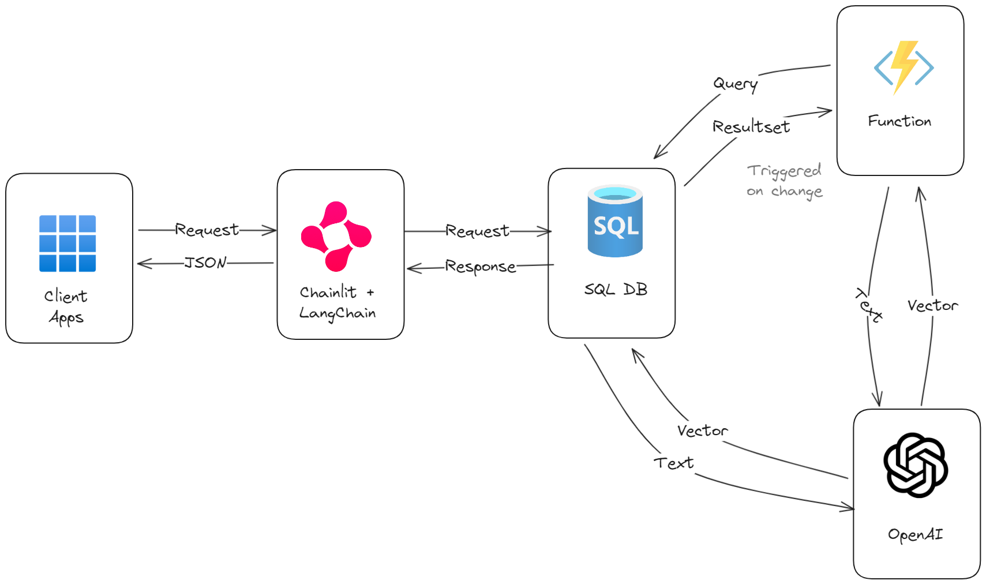
LangChain Database Architecture
System Components
  • Database Connection: SQLAlchemy connection to your database (SQLite, MySQL, PostgreSQL, etc.)
  • LLM Integration: Connection to OpenAI, Anthropic, or other LLM APIs
  • LangChain Tools: Specialized tools for SQL query generation and validation
  • Agent Framework: LangChain's agent system for orchestrating complex interactions
  • Chat Interface: Frontend for user interactions with the system
Security Considerations

⚠️ Important Security Warning

Building Q&A systems for SQL databases requires executing model-generated SQL queries. There are inherent risks in doing this:

  • Always use read-only database connections when possible
  • Scope database permissions as narrowly as possible
  • Consider implementing additional validation layers
  • Monitor query patterns and implement rate limiting

Process Flow

1

User Query Input

The user enters a natural language question about the database data.

Example: "Which country's customers spent the most?"
2

Database Schema Analysis

The system uses ListSQLDatabaseTool and InfoSQLDatabaseTool to understand the database structure.

Tables identified: Customer, Invoice, InvoiceLine
3

SQL Query Generation

The LLM converts the natural language question into a SQL query based on the schema.

SELECT c.Country, SUM(i.Total) AS TotalSpent
FROM Customer c
JOIN Invoice i ON c.CustomerId = i.CustomerId
GROUP BY c.Country
ORDER BY TotalSpent DESC
LIMIT 1
4

Query Validation

The QuerySQLCheckerTool validates the SQL query for errors and potential improvements.

Query validated successfully
5

Database Execution

The QuerySQLDataBaseTool executes the SQL query against the database.

[('USA', 523.0600000000003)]
6

Result Interpretation

The LLM translates the raw query results into a natural language response.

"Customers from the USA spent the most, with a total amount spent of $523.06."

Sample Queries You Can Try

Sales Analysis

Which country's customers spent the most?

Sales Geography Aggregation

Artist Popularity

Who are the top 3 best selling artists?

Artists Sales Ranking

Genre Analysis

What's the most popular music genre by sales?

Genres Popularity Analysis

Customer Insights

Which customer has purchased the most tracks?

Customers Purchases Loyalty

Time-based Analysis

What was the highest sales month in 2021?

Time Sales Seasonal

Complex Relationship

Which employee has the highest sales through their customers?

Employees Customers Relationships

Implementation Code

Setting Up the Environment

# Install required packages pip install langchain langchain-community langchain-openai langgraph # Import necessary modules import os from langchain_openai import ChatOpenAI from langchain_community.utilities import SQLDatabase from langchain import hub from langchain_community.tools.sql_database.tool import QuerySQLDatabaseTool from langgraph.prebuilt import create_react_agent # Set your OpenAI API key os.environ["OPENAI_API_KEY"] = "your-api-key-here"

Database Connection

# Connect to an SQLite Database from sqlalchemy import create_engine from sqlalchemy.pool import StaticPool # For an existing SQLite database db_path = "chinook.db" # Path to your SQLite database engine = create_engine(f"sqlite:///{db_path}") db = SQLDatabase(engine) # Alternatively, for in-memory testing with example data def get_in_memory_db(): import sqlite3 import requests url = "https://raw.githubusercontent.com/lerocha/chinook-database/master/ChinookDatabase/DataSources/Chinook_Sqlite.sql" response = requests.get(url) sql_script = response.text connection = sqlite3.connect(":memory:", check_same_thread=False) connection.executescript(sql_script) return create_engine( "sqlite://", creator=lambda: connection, poolclass=StaticPool, connect_args={"check_same_thread": False}, ) engine = get_in_memory_db() db = SQLDatabase(engine)

Creating the LangChain Agent

# Initialize Language Model llm = ChatOpenAI(model="gpt-4") # You can also use gpt-3.5-turbo for lower cost # Initialize SQL Database Toolkit from langchain_community.agent_toolkits.sql.toolkit import SQLDatabaseToolkit toolkit = SQLDatabaseToolkit(db=db, llm=llm) # Get the tools from the toolkit tools = toolkit.get_tools() # Get a prompt from LangChain Hub prompt_template = hub.pull("langchain-ai/sql-agent-system-prompt") system_message = prompt_template.format(dialect="SQLite", top_k=5) # Create the agent agent_executor = create_react_agent( llm, tools, state_modifier=system_message )

Django Integration (views.py)

# views.py for Django integration from django.http import JsonResponse from django.views.decorators.csrf import csrf_exempt import json @csrf_exempt def chat_with_db(request): if request.method == 'POST': try: data = json.loads(request.body) user_message = data.get('message', '') # Process the user message with our agent response = agent_executor.invoke( {"messages": [("user", user_message)]} ) # Extract the final AI message ai_message = response["messages"][-1].content return JsonResponse({ 'success': True, 'message': ai_message }) except Exception as e: return JsonResponse({ 'success': False, 'error': str(e) }) return JsonResponse({ 'success': False, 'error': 'Only POST requests are supported' })

Frontend JavaScript

// JavaScript for the chat interface document.addEventListener('DOMContentLoaded', function() { const messageInput = document.querySelector('.chat-input input'); const sendButton = document.querySelector('.chat-input button'); const messagesContainer = document.querySelector('.chat-messages'); const sampleQueries = document.querySelectorAll('.sample-query'); // Function to add a message to the chat function addMessage(message, isUser = false) { const messageDiv = document.createElement('div'); messageDiv.className = isUser ? 'user-message' : 'bot-message'; messageDiv.innerHTML = message; messagesContainer.appendChild(messageDiv); messagesContainer.scrollTop = messagesContainer.scrollHeight; } // Function to send a message to the backend async function sendMessage(message) { addMessage(message, true); // Show loading indicator const loadingDiv = document.createElement('div'); loadingDiv.className = 'bot-message'; loadingDiv.innerHTML = '<i class="fas fa-spinner fa-spin"></i> Thinking...'; messagesContainer.appendChild(loadingDiv); try { const response = await fetch('/chat_with_db/', { method: 'POST', headers: { 'Content-Type': 'application/json', }, body: JSON.stringify({ message: message }), }); const data = await response.json(); // Remove loading indicator messagesContainer.removeChild(loadingDiv); if (data.success) { addMessage(data.message); } else { addMessage('Error: ' + data.error); } } catch (error) { // Remove loading indicator messagesContainer.removeChild(loadingDiv); addMessage('An error occurred while connecting to the server.'); } } // Event listener for send button sendButton.addEventListener('click', function() { const message = messageInput.value.trim(); if (message) { sendMessage(message); messageInput.value = ''; } }); // Event listener for enter key messageInput.addEventListener('keypress', function(e) { if (e.key === 'Enter') { const message = messageInput.value.trim(); if (message) { sendMessage(message); messageInput.value = ''; } } }); // Event listeners for sample queries sampleQueries.forEach(query => { query.addEventListener('click', function() { const questionText = this.querySelector('p').textContent; messageInput.value = questionText; messageInput.focus(); }); }); });

LangChain DB Chat Demo

Built with LangChain, Python, and modern web technologies.

⚠️ Security Note: Always implement proper permissions and validation when connecting LLMs to databases.