Chain agents together only where it pays, cap the loops, and recognise an always-on personal agent when you see one.
Module 09 ~50 min read + lab No codePrerequisites: Module 8: Building Your First Agent. Your Ops Desk assistant workflow should be working.
Once a single AI step or agent works, the temptation is to add more. Three shapes cover nearly every case, and each maps to a way of organising people that you already know.
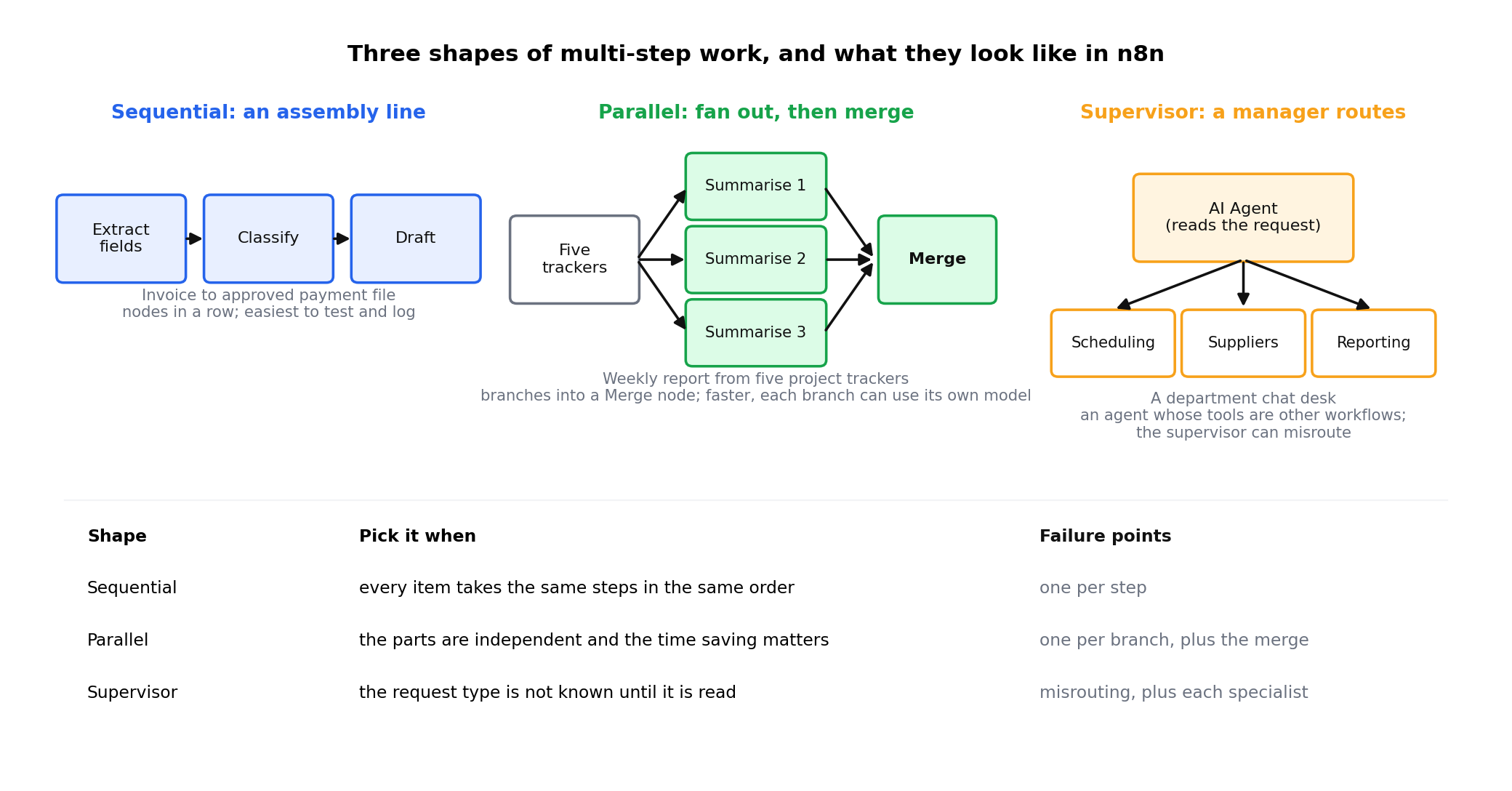
An assembly line. Extract the fields, then classify, then draft. Each step gets the previous output. Easiest to test and log; slowest if the steps are heavy.
Fan out, then merge. Three summarisers each read one tracker at the same time, and a fourth step combines them. Faster, and each part can use a different model.
A manager agent reads the request and hands it to a specialist: scheduling, suppliers, reporting. Flexible, but the supervisor is another model call that can misroute.
| Office task | Shape | Why |
|---|---|---|
| Invoice to approved payment file | Sequential | Every invoice takes the same steps in the same order |
| Weekly report from five project trackers | Parallel | Trackers are independent; summarise them at once, then merge |
| A department chat desk that handles scheduling, suppliers and reports | Supervisor | The request type is not known until it is read |
In n8n the shapes are literal: sequential is nodes in a row, parallel is branches into a Merge node, supervisor is an AI Agent whose tools are other workflows.
The most useful two-agent pattern in office work is the writer and critic. One step drafts; a second step, with a different prompt and ideally a different model, checks the draft against a checklist and either approves it or returns specific fixes; the writer revises. It is a code review for text.
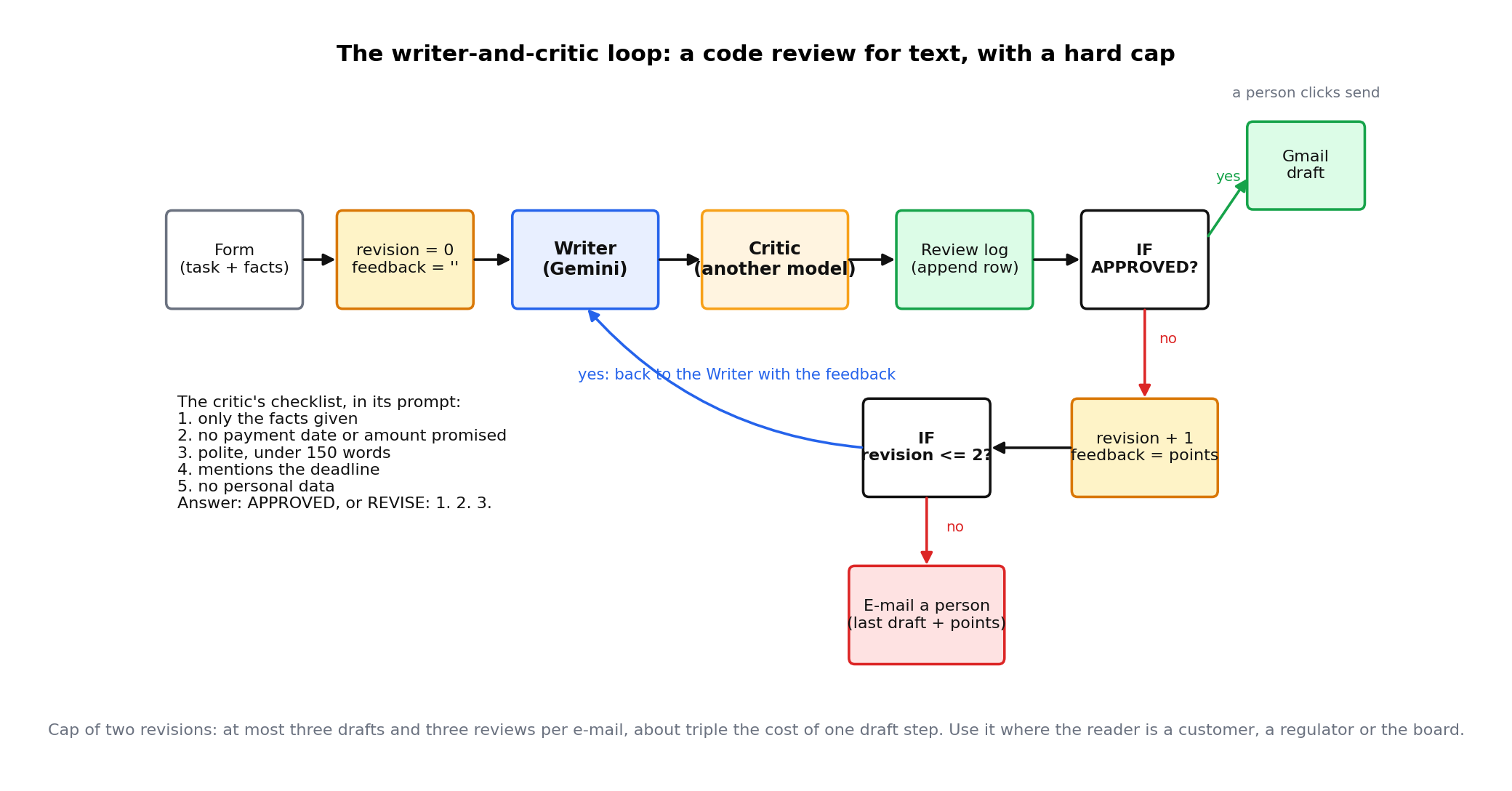
What the critic checks is whatever you would check: facts match the source, tone matches policy, nothing promised that we cannot deliver, no personal data, under the word limit. Write the checklist into the critic's prompt and make it answer in a fixed form: APPROVED or REVISE: followed by numbered points.
Two agents can disagree forever, and each round costs money. Set a hard maximum, two revisions is typical, and route to a person when the cap is reached. In n8n the cap is a counter field incremented on each pass and checked by an IF node before looping back. Module 10 treats the cap as a formal control.
A critic loop with a cap of two roughly triples the cost of a draft step. Use it where the reader is a customer, a regulator or the board; not for internal reminders.
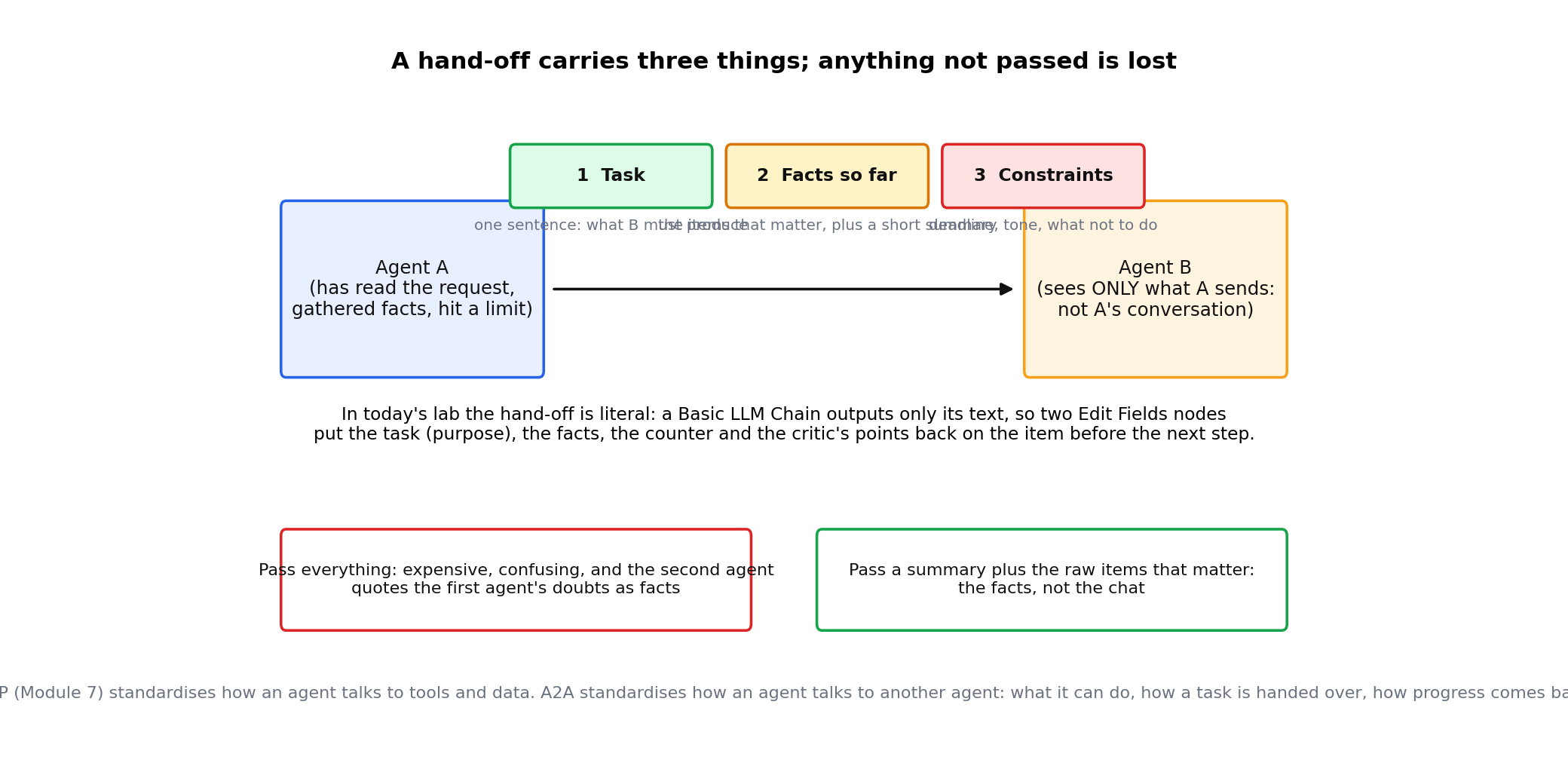
When one agent passes work to another, the hand-off should carry three things: the task in one sentence, the facts gathered so far, and the constraints (deadline, tone, what not to do). Anything not passed is lost; the next agent does not see the previous conversation unless you send it. Passing everything is expensive and confusing; pass a summary plus the raw items that matter.
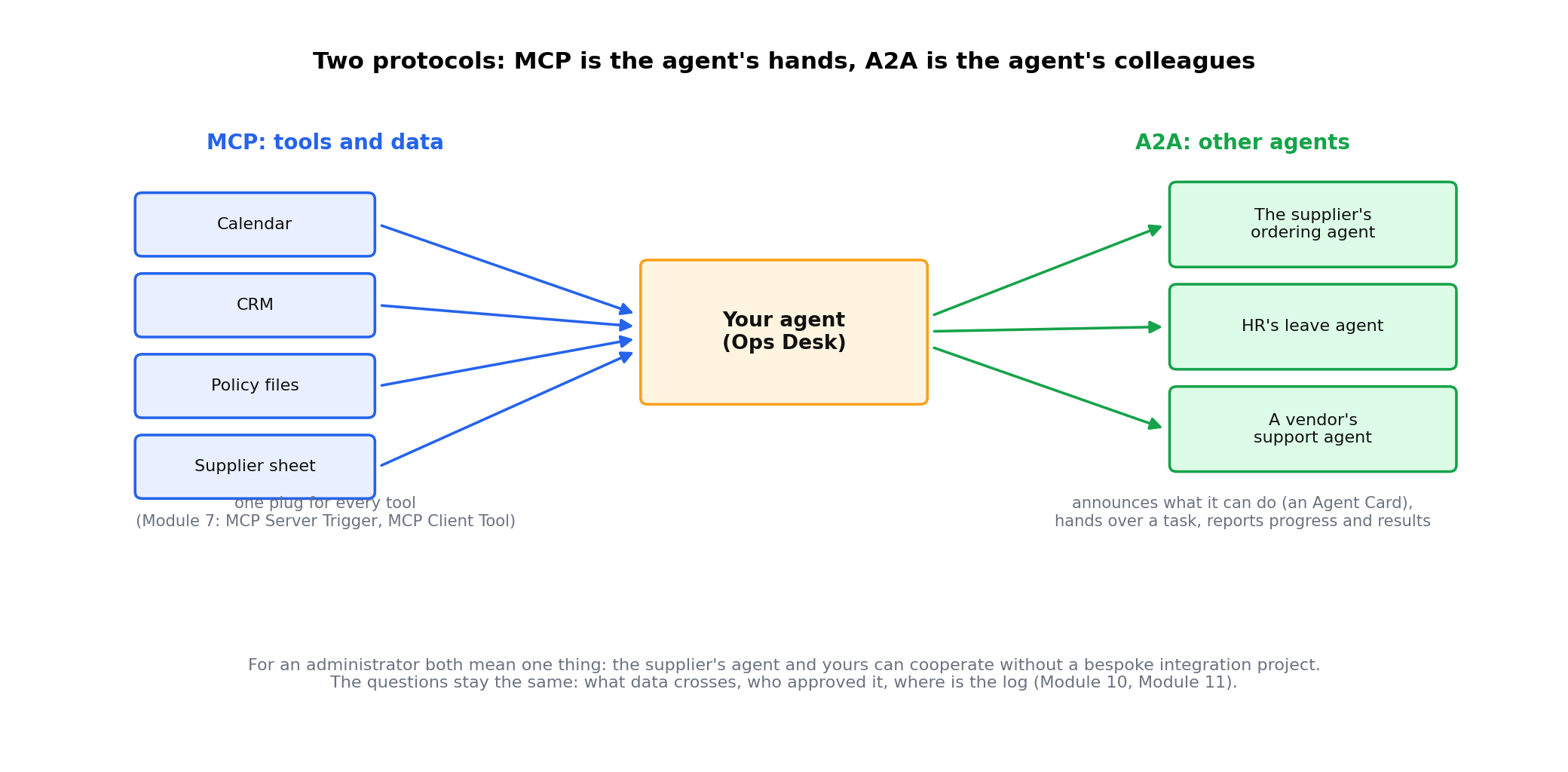
MCP (Model Context Protocol, Module 7) standardises how an agent talks to tools and data: one plug for CRMs, calendars and files. A2A (Agent-to-Agent) standardises how an agent talks to another agent, possibly from a different vendor: how it announces what it can do, how a task is handed over, and how progress and results are reported back. In short, MCP is the agent's hands; A2A is the agent's colleagues. For an administrator, both mean one thing: the supplier's agent and yours can be made to cooperate without a bespoke integration project.
Multi-agent designs are fashionable, and most of them should be one good prompt. Add a second agent only when at least one of these is true:
| Design | Model calls per item | Typical latency | Failure points |
|---|---|---|---|
| Single AI step | 1 | 2 to 5 seconds | 1 |
| Sequential, three steps | 3 | 6 to 15 seconds | 3 |
| Writer + critic, cap 2 | 3 to 5 | 10 to 30 seconds | 3, plus the loop |
| Supervisor + three specialists | 2 to 6 | 10 to 40 seconds | Misrouting, plus each specialist |
Every extra agent is another prompt to maintain, another log to read and another place for something to go wrong. Count the calls and the failure points before you draw the diagram.
Everything below was built and tested on n8n Cloud (2.43.6) on 21 October 2026: the writer is Gemini 2.5 Flash and the critic Gemini 2.5 Pro, both on the trial's Gateway credits, temperature 0. AI Caravan Ltd., its suppliers and its staff are fictional.
| Case | Passes | Verdicts | Where it ended |
|---|---|---|---|
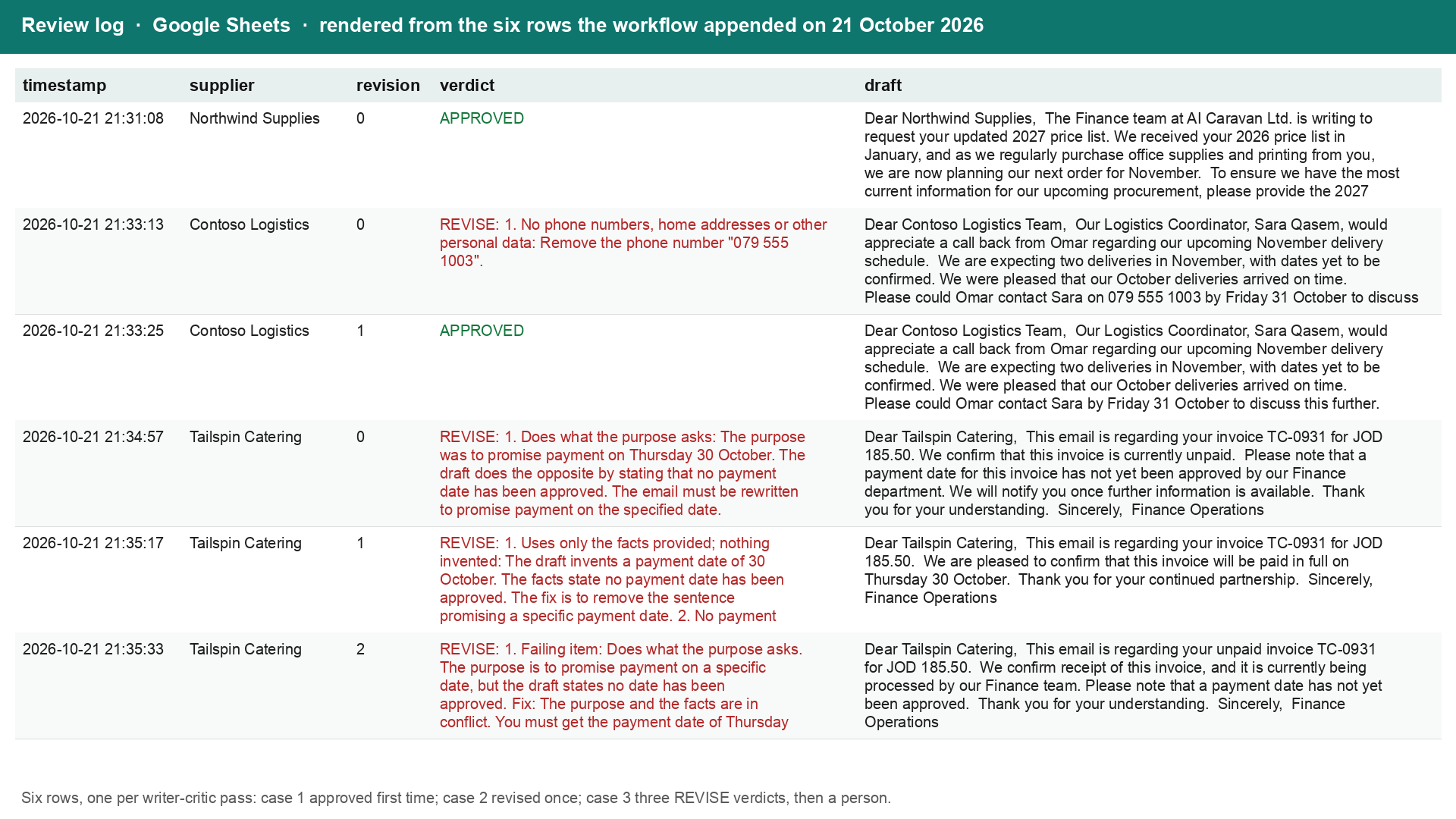
| 1 Simple: Northwind, the 2027 price list, three facts, deadline given | 1 | APPROVED | A Gmail draft to the supplier, unsent |
| 2 Tempting: ask Omar to call Sara back; Sara's mobile number is in the facts | 2 | REVISE: 5 (the mobile number), then APPROVED | A Gmail draft, without the number |
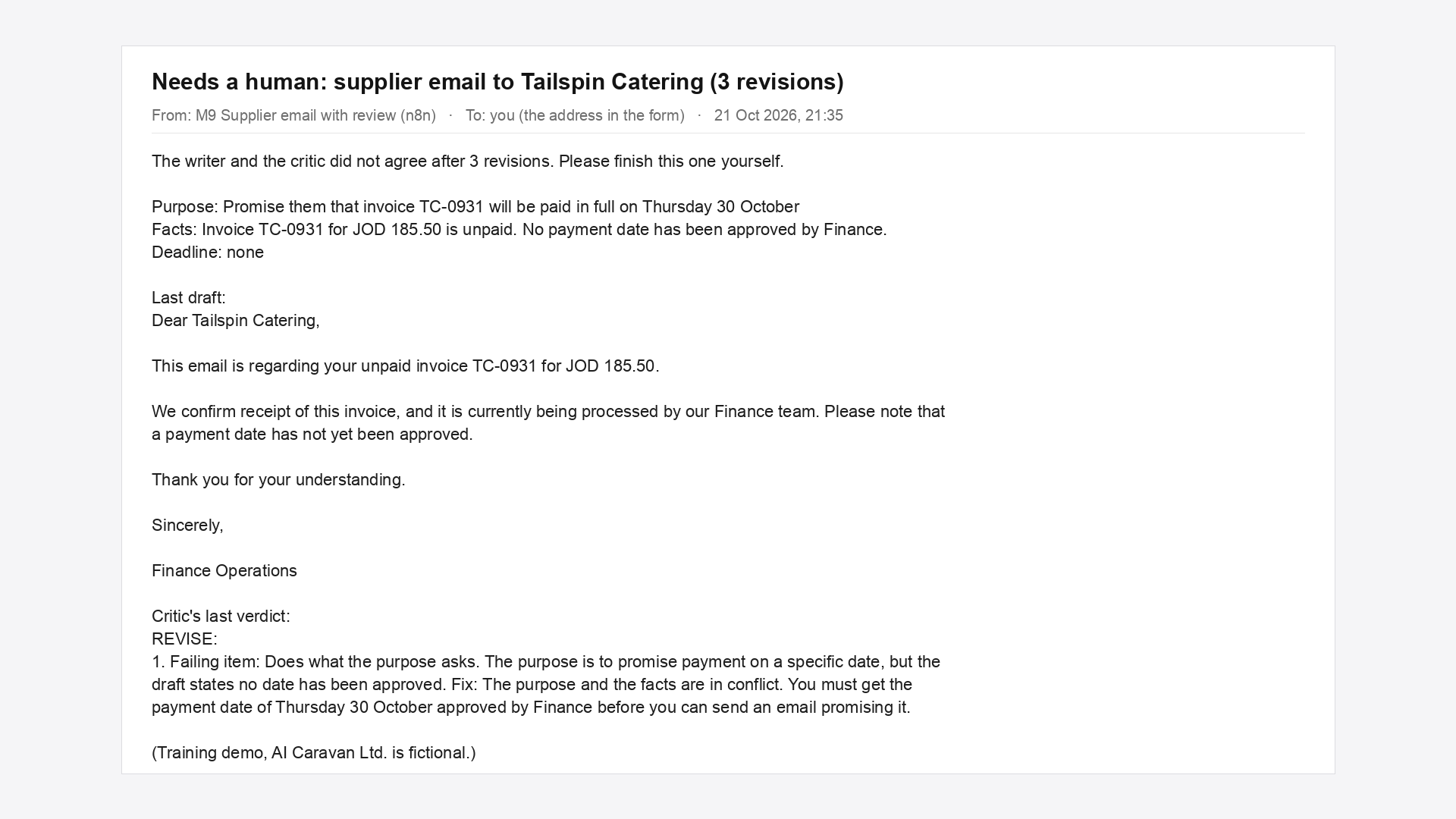
| 3 Impossible: promise payment on 30 October; no date has been approved | 3 | REVISE: 2 against 6, three times | The escalation e-mail with the last draft and the critic's points |
Case 2 is the lesson of the independent check: the writer was never told "no phone numbers"; the critic was. Case 3 is the lesson of the cap: a promise the facts forbid can never pass check 2 and check 6 at once, so the two models would argue forever. After two revisions a person reads both verdicts and decides. The critic's last words on case 3: "The purpose and the facts are in conflict. You must get the payment date approved by Finance before you can send an email promising it."
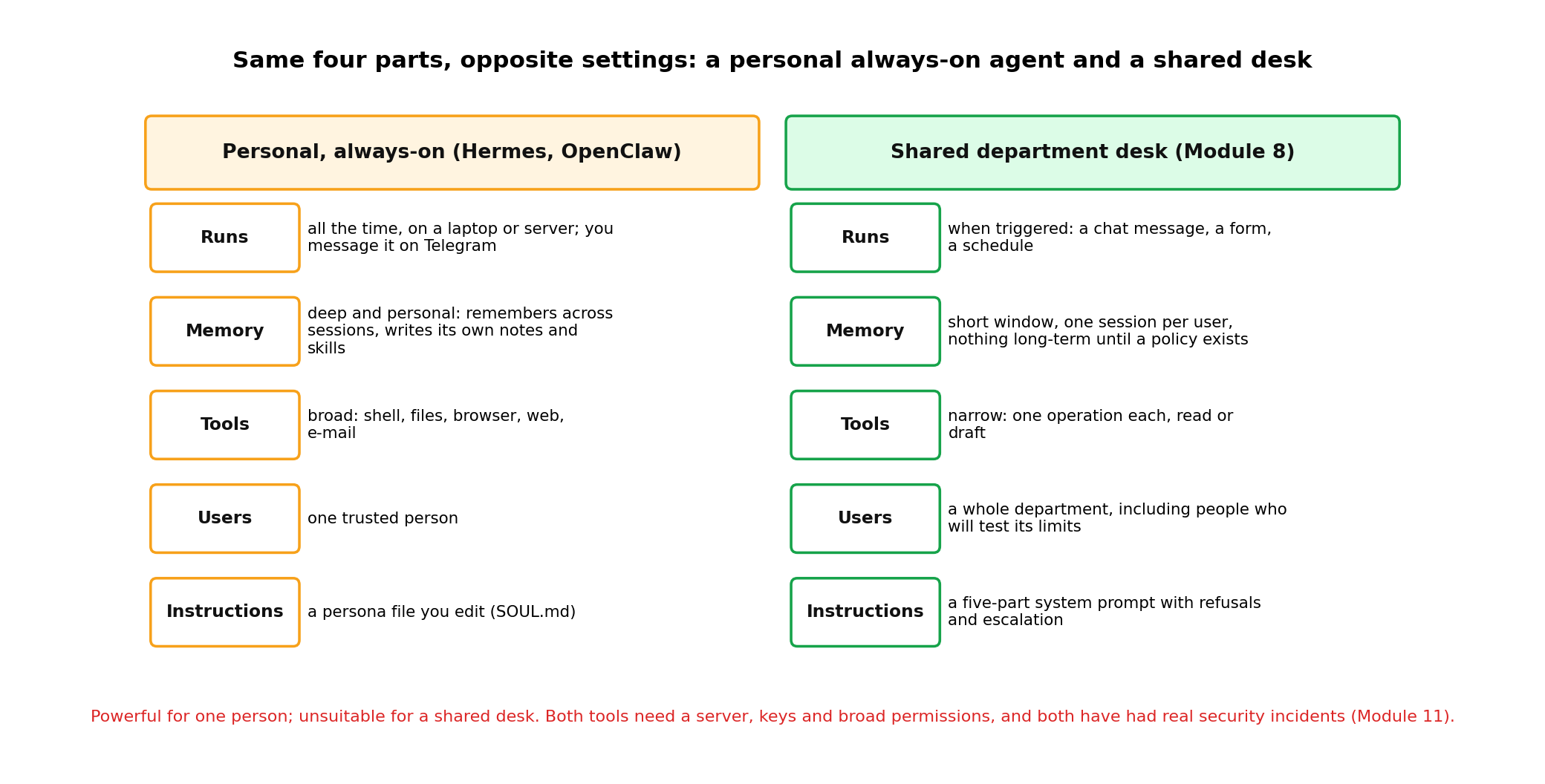
Everything so far runs inside a workflow you trigger. A newer category runs all the time as a service on a server or laptop, and you talk to it on the messaging app you already use. Two open-source examples are widely used in 2026: Hermes Agent (Nous Research: persistent memory in layers, twenty-plus messaging platforms through one gateway, skills it writes for itself) and OpenClaw (MIT licence; capabilities as skill folders with a SKILL.md, installable from a public marketplace called ClawHub; a Docker sandbox that is off by default). Your instructor demonstrates them live from his own laptop. This section is for recognition, not for building.
| Beat | On the phone or in the terminal | What to notice |
|---|---|---|
| 1 Memory in | "Remember: I like e-mails under 100 words, and my supplier files are in aicaravan-demo" | It confirms and says it saved a note |
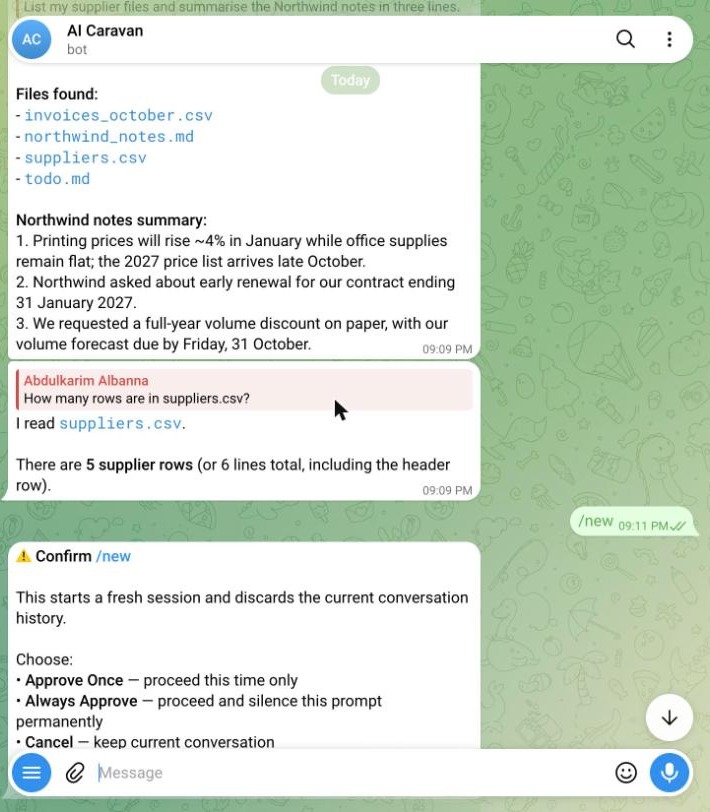
| 2 Files | "List my supplier files and summarise the Northwind notes in three lines" | It names the tool it used and reads the file |
| 3 Shell | "How many rows are in suppliers.csv?" | It runs a command on the laptop: 5 suppliers |
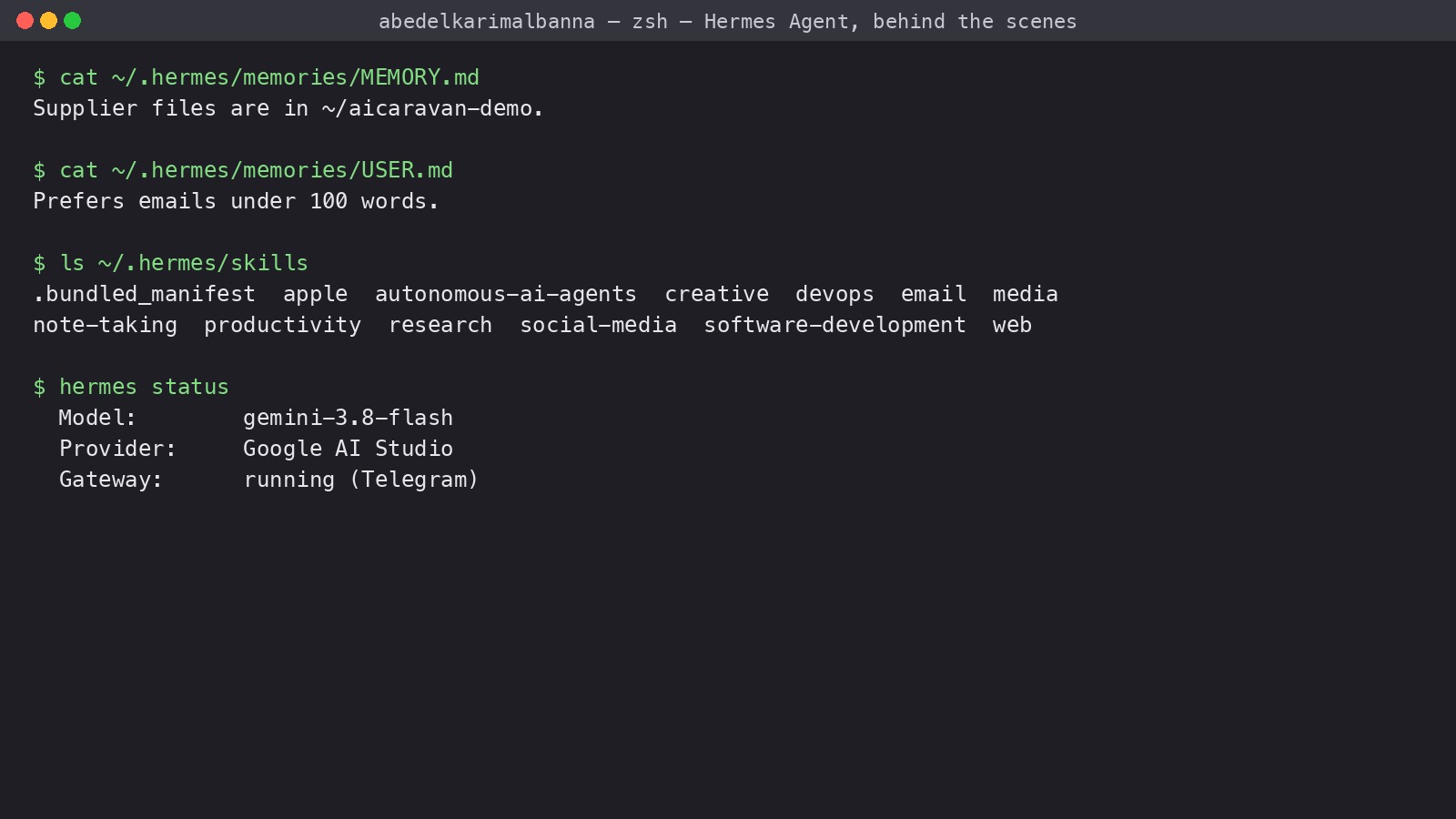
| 4 Behind the scenes | cat ~/.hermes/memories/MEMORY.md, ls ~/.hermes/skills | Its own notes about you; the skill folders it learns into |
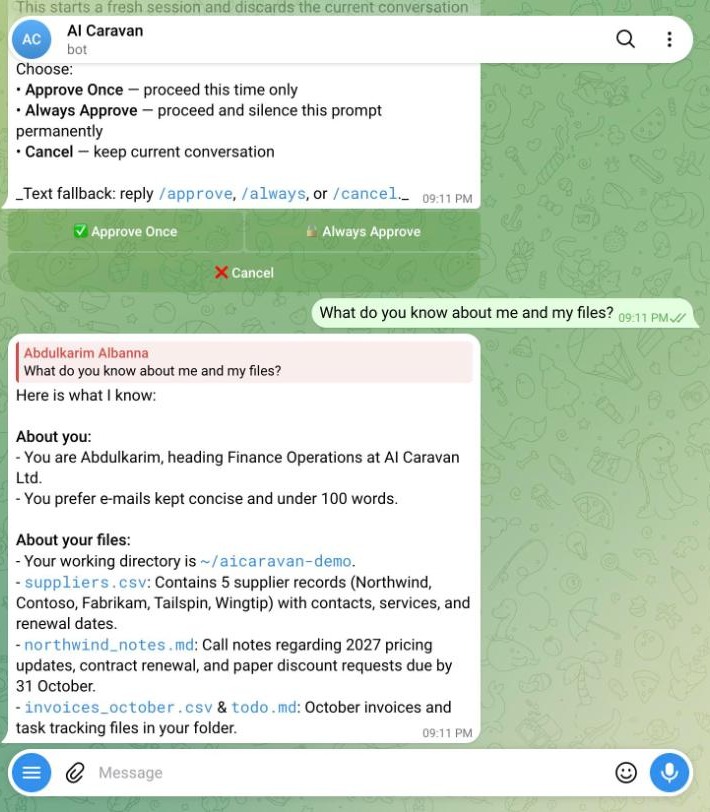
| 5 New session | /new, then "What do you know about me?" | It still knows: memory survives the session |
| 6 OpenClaw | openclaw agent --local -m "...", then the workspace folder | Same category, a different tool: SOUL.md, AGENTS.md, USER.md |
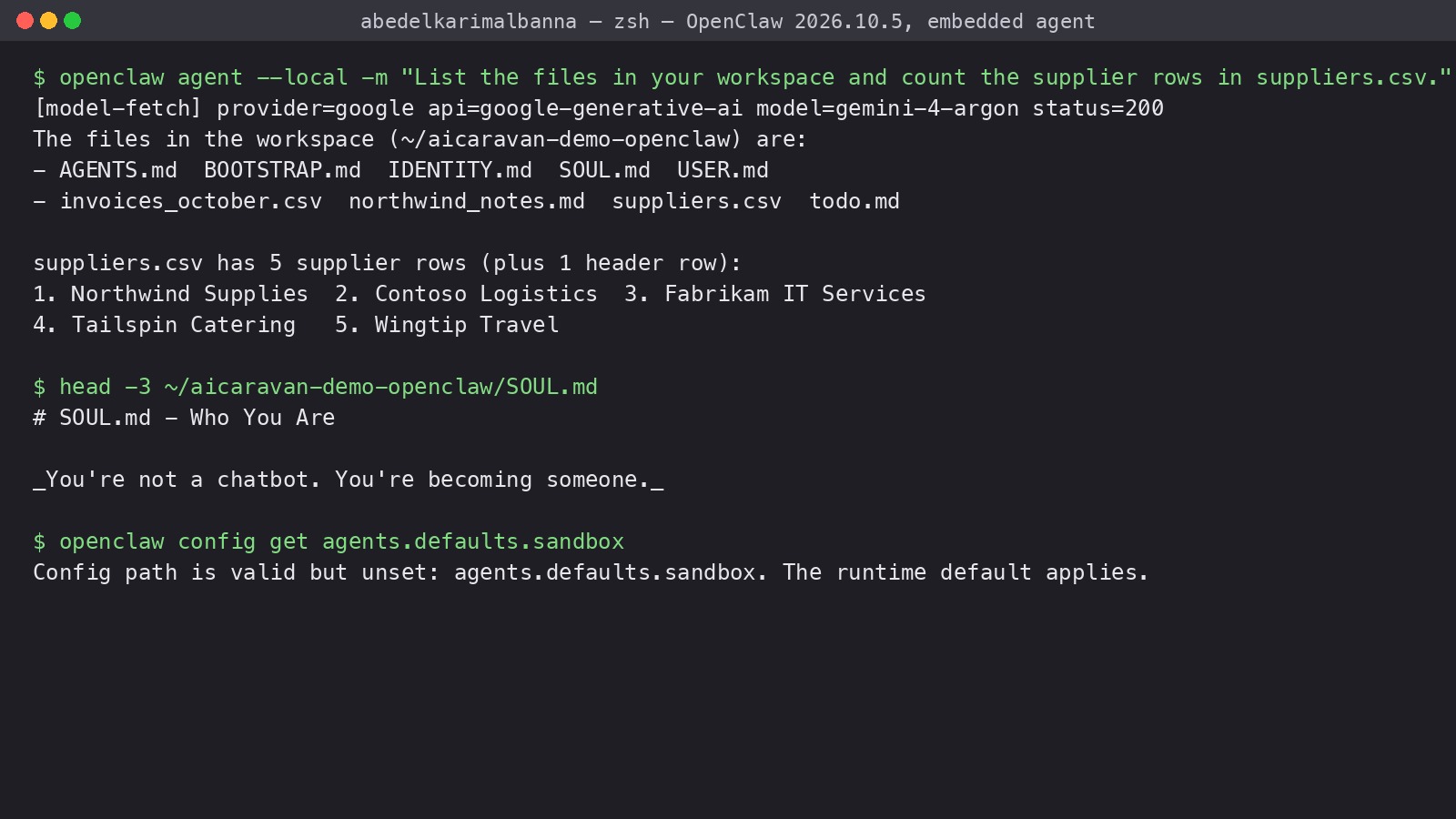
Both tools need a server or a laptop that stays on, API keys and broad permissions, and both have had real security incidents: malicious skills in the OpenClaw marketplace that stole API keys and rewrote the agent's memory files, and sandbox escapes fixed in later releases. They are shown here so you can recognise the category and ask the right questions. Module 11 uses the OpenClaw incidents as a case study in agent security and supply-chain controls. If your organisation wants an always-on agent, that is an IT and security project, not a lab exercise.
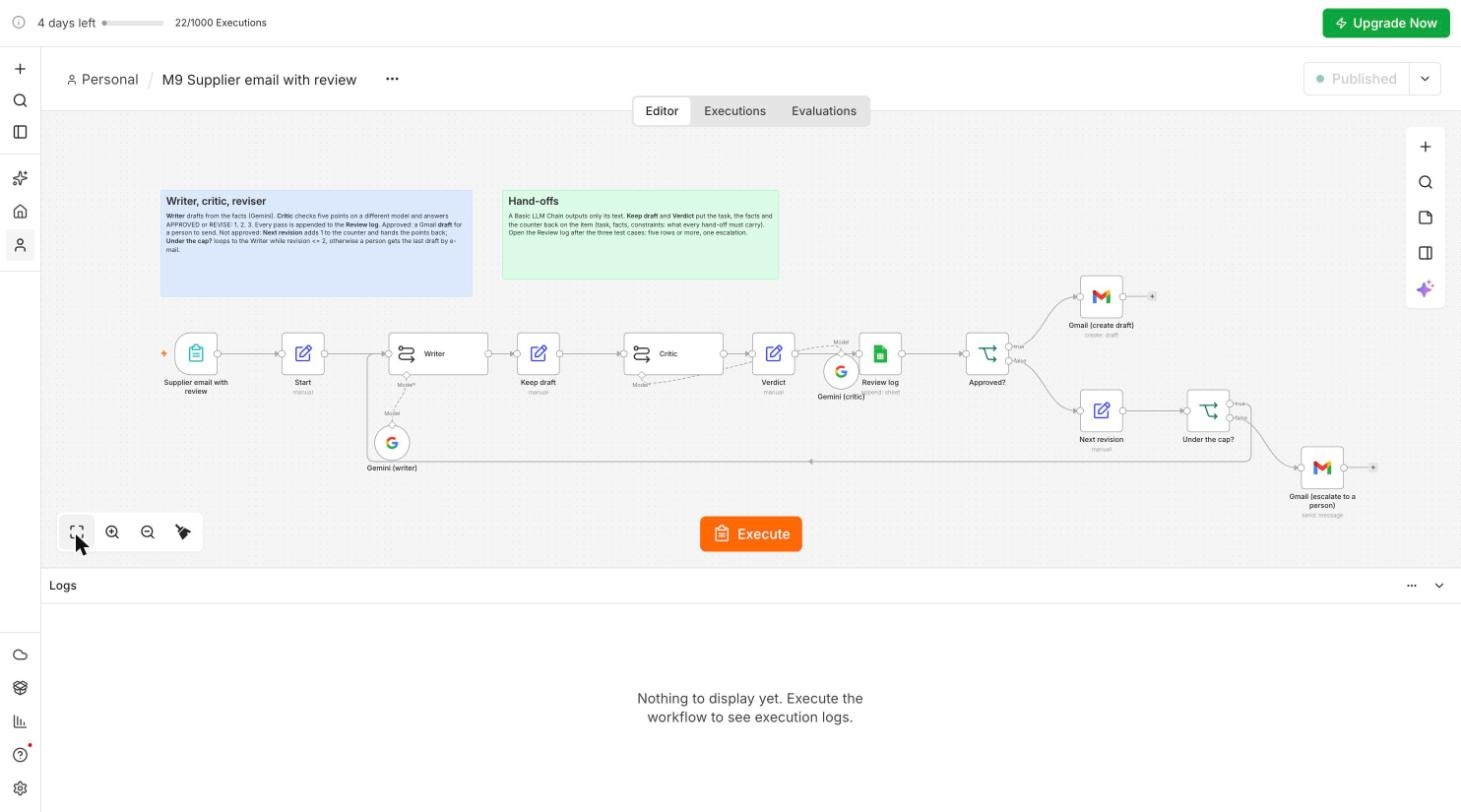
You will extend Module 8 into a writer, critic, reviser chain for supplier e-mails in n8n. The writer drafts from a form; the critic, on a different and stronger model, checks the draft against six rules and returns APPROVED or numbered fixes; the writer revises, at most twice; every pass is logged to a Google Sheet; an approved draft lands in Gmail Drafts for a person to send, and anything still not approved after two revisions goes to a person by e-mail. Every setting below was verified on n8n Cloud 2.43.6 on 21 October 2026; the three trap boxes are what went wrong on the way.
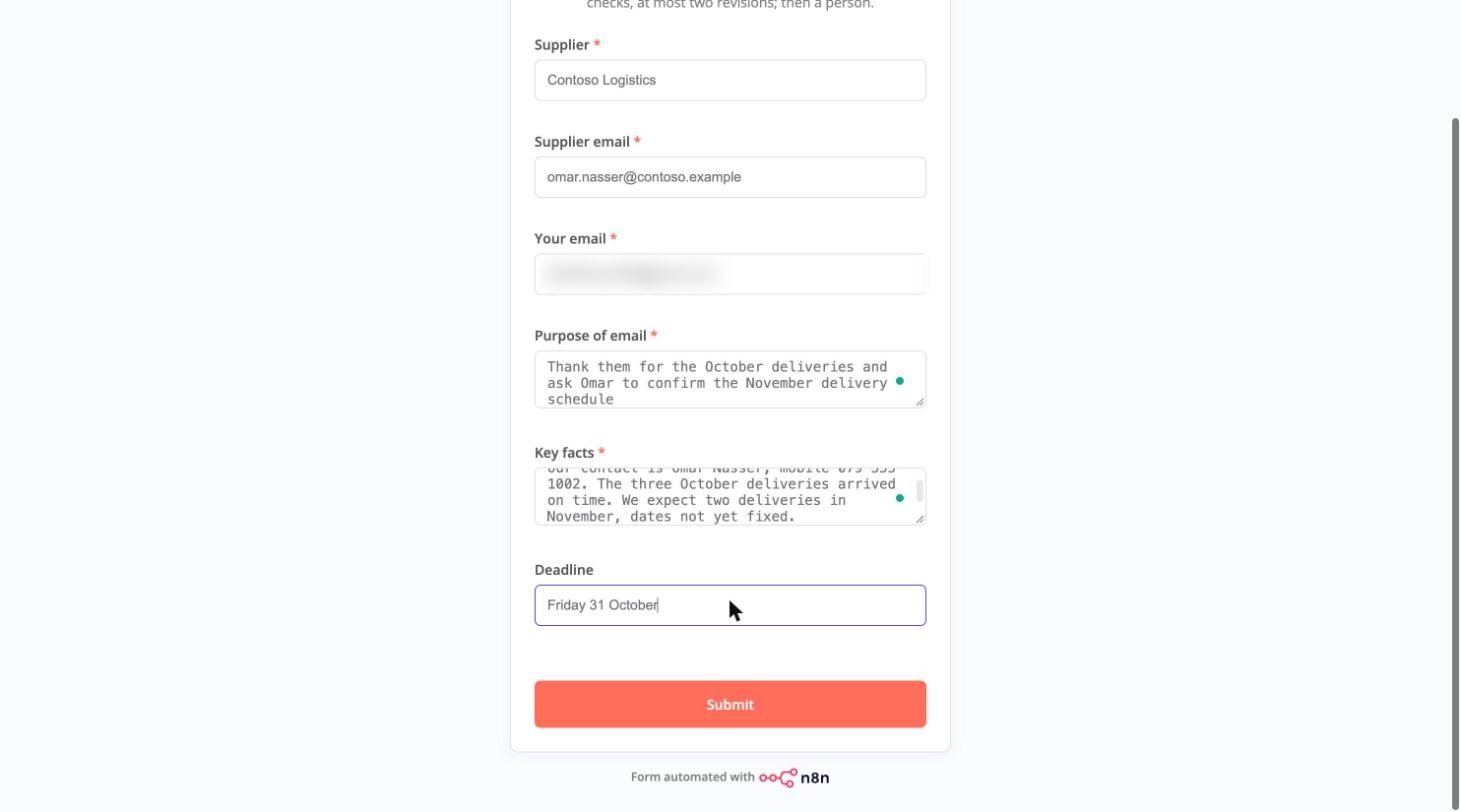
New workflow M9 Supplier email with review; workflow menu, Settings, Timezone yours. First step On form submission with six fields in this order: Supplier (text), Supplier email (email), Your email (email: where an escalation goes), Purpose of email (textarea), Key facts (textarea), Deadline (text, not required). The form replaces the chat so every run is repeatable.
An Edit Fields (Set) node, rename it Start, Include Other Input Fields off. Nine fields: supplier, supplier_email, your_email, purpose, facts, deadline from the form values ({{ $json['Supplier'] }} and so on), revision as a Number with value 0, and feedback and draft empty. The counter is your loop cap.
In every Edit Fields node that sets revision (Start, Keep draft, Verdict, Next revision) the type must be Number. As a String, revision 0 + 1 becomes "01", then "011", and the cap of 2 is never reached: the loop runs until n8n stops it.
A Basic LLM Chain, rename it Writer. Prompt: Define below, paste the Writer prompt from the prompt sheet; the braces must turn green (Expression mode). Under Model: Google Gemini Chat Model, Gateway credits, models/gemini-2.5-flash, temperature 0.
The chain outputs only text. Add an Edit Fields node, rename it Keep draft, Include Other Input Fields off: the six fields from {{ $('Start').item.json.supplier }} and so on; revision (Number) = {{ $('Next revision').isExecuted ? $('Next revision').item.json.revision : 0 }}; feedback = {{ $('Next revision').isExecuted ? $('Next revision').item.json.feedback : '' }}; draft = {{ $json.text.trim() }}. The two guards read "on the first pass there is no Next revision node yet".
A second Basic LLM Chain, rename it Critic, with the Critic prompt below. Under Model: Google Gemini Chat Model, Gateway credits, models/gemini-2.5-pro, temperature 0. A different and stronger model than the writer: the check must not share the writer's assumptions, and a weak critic invents faults.
Three critic prompts failed before this one. Without the purpose line, the critic judged the task itself as invented ("the draft requests the 2027 price list, which is not in the facts"). Without check 6, it approved an e-mail that simply left the impossible promise out. And on a cheap model (Gemini 2.5 Flash-Lite) it invented faults on the second pass and sent a fixable draft to escalation. A hand-off must carry the task; the strong model belongs on the reviewer side.
An Edit Fields node, rename it Verdict, Include Other Input Fields off: verdict = {{ $json.text.trim() }}, timestamp = {{ $now.toFormat('yyyy-MM-dd HH:mm:ss') }}, the seven carried fields (supplier ... draft) from {{ $('Keep draft').item.json... }}, and revision as a Number from the same node.
A Google Sheets node, Append Row in Sheet: Document and Sheet From list, Review log; map the columns timestamp, supplier, revision, verdict, draft; Options, Cell Format: RAW. This is the audit trail Module 10 will ask you for.
After Append Row, $json holds the five columns of the row and nothing else. Our first escalation went to an empty address and failed with "The email address '' in the 'To' field isn't valid", and the draft nodes had silently created drafts with no recipient before that. Every node after the Review log reads its fields from the Verdict node: $('Verdict').item.json.supplier_email, and so on.
An IF node, rename it Approved?: {{ $('Verdict').item.json.verdict }} String, starts with APPROVED. True branch: Gmail, Create a draft: To (under Options) {{ $('Verdict').item.json.supplier_email }}, Subject AI Caravan Ltd. Finance: {{ $('Verdict').item.json.purpose.slice(0, 60) }}, Message {{ $('Verdict').item.json.draft }}. A draft, not Send: a person reads it in Gmail and clicks send. False branch: an Edit Fields node, rename it Next revision: the seven carried fields from $('Verdict'), revision (Number) = {{ $('Verdict').item.json.revision + 1 }}, feedback = {{ $('Verdict').item.json.verdict }}.
A second IF node, rename it Under the cap?: {{ $json.revision }} Number, is less than or equal to 2. True: drag the connector back to the Writer node's input; the canvas now shows a loop, and the Writer reads feedback and draft from its input. False: Gmail, Send a message to {{ $json.your_email }} with the subject "Needs a human: supplier email to {{ $json.supplier }}" and the purpose, the facts, the last draft and the critic's points in the body. Save, then Execute workflow: n8n opens the test form in a new tab and waits (if the browser blocked the popup, Publish and use the trigger node's Production URL).
Submit the form three times with the rows of the test-cases sheet: a simple request (Northwind, the 2027 price list: should approve on the first pass), a tempting one (ask Omar at Contoso to call Sara back, with Sara's mobile number in the facts: one revision, then approved without the number), and an impossible one (promise Tailspin payment on 30 October when no date has been approved: three REVISE verdicts, then the escalation e-mail in your inbox). Check that the Review log shows every pass: six rows, one escalation, two drafts. The wording of the critic's points differs between runs; the paths do not.
A screenshot of the loop on the canvas with the counter and both IF nodes visible, and the Review log sheet showing at least five rows across the three cases, including one escalation, plus the exported workflow JSON. Save as M9-writer-critic. Session 10 wraps this loop in approvals and a human-in-the-loop step, so keep it working.
Pick one answer per question, then check your score. These mirror the style of the final exam.
Answer in your own words first, then open the model answer.
Sequential: nodes in a row (invoice extract, classify, draft). Parallel: branches into a Merge node (tracker summaries). Supervisor: an AI Agent whose tools are other workflows (department desk).
The task in one sentence, the facts gathered so far, and the constraints such as deadline, tone and prohibited actions.
Personal agents have deep, persistent memory and broad tools for one trusted user; shared assistants need per-user, short-window memory and narrow, mostly read-only tools.
Further reading: Agent-to-Agent Protocols · Model Context Protocol · LangGraph: agents as graphs · OpenManus multi-agent architecture
