Every e2e test is built from three kinds of step. Learn when each one is the right tool, what it costs, and how the replay cache makes agent steps nearly free on the second run.
Module 02 ~40 min read + lab TypeScripttest, describe, hooks, options and fixtures.screen queries, act on them, and check them with expect.agent.act, agent.assert, agent.waitFor and agent.extract well.Prerequisites: Module 1 and the TaskFlow project from its lab, with one green run.
A test is a list of steps. Each step is one of three kinds, and the kind decides whether a model is called.
| Kind | API | Calls a model? | Use it when |
|---|---|---|---|
| Goal | agent.act | Yes, unless the replay cache replays it | You care about the outcome, not the exact clicks |
| Assertion (judgement) | agent.assert, agent.waitFor, agent.extract | Yes, every time | The check is about meaning ("greets Ada by name") or the data is hard to locate |
| Locator | screen and expect | No | You know the exact control or the exact value |
Await every agent call, every screen action and every expect on a locator. If a test returns while a step is still running, it fails with STEP_NOT_AWAITED.
A test receives fixtures: ready-made objects the runner prepares for each attempt. You ask for the ones you need by name.
| Fixture | What it gives you |
|---|---|
app | The app lifecycle on every platform: open(path), restart(), clearState(), back(), screenshot(label). |
screen | Locator queries and gestures on what is shown now. |
agent | act, assert, waitFor, extract. |
browser (web) / device (mobile) | Engine-specific controls: routes, cookies and dialogs on the web; permissions and location on devices. Import test from @e2e-dev/web or @e2e-dev/mobile to have them typed. |
Group tests with describe, share set-up with hooks, and pass options as the second argument:
test.skip(condition, reason) skips at run time; the report shows skipped.{ serial: true } on a group runs its tests in order on one worker, and retries them together.tags, platforms, agent, trace and video.The docs show import { test, expect } from 'e2e'. That works in the 0.18.0 release too; the generated example imports test (plus describe and the hooks) from @e2e-dev/web instead, which adds the typed browser fixture. Both forms ran in our tests. Every API shown in this module exists in 0.18.0; we checked the package's type definitions.
screen and expectA locator finds a known control without a model. Prefer queries a user would recognise: role and name first, label second, test id last. These are the same accessible names a screen reader announces, so a test that relies on them also nudges the app towards accessibility.
| Group | Methods |
|---|---|
| Queries | getByRole(role, name?), getByLabel, getByText, getByPlaceholder, getByDisplayValue, getByTestId |
| Refinement | .filter({ hasText, has }), .first(), .last(), .nth(i), and queries chained inside a locator |
| Actions | tap/click, fill, clear, press, check, selectOption, hover, dragTo, setInputFiles, longPress, swipe |
| Reads (no retry) | textContent(), inputValue(), getAttribute(), isVisible(), count(), allTextContents() |
expect has two families of matcher:
toBeVisible, toBeHidden, toBeEnabled, toBeChecked, toBeFocused, toHaveText, toContainText, toHaveValue, toHaveAttribute, toHaveCount, toHaveAccessibleName. Always await them.
toBe, toEqual, toMatchObject, toContain, toHaveLength, toMatch, toBeGreaterThan and friends, for plain values such as the result of agent.extract. Also expect.poll and expect.soft.
An action, a read, or a single-node assertion fails when its query finds more than one node (LOCATOR_AMBIGUOUS). Narrow it with .filter(), .first() or .nth().
agent.actOne call, one goal. The agent chooses and performs the actions, returns when the goal is complete, and throws when it fails. You control the order of the goals; the agent controls the flow inside each one.
params and refer to it as {name}. A password goes in as a Secret; the model never sees its value (Module 3).timeout, maxSteps, maxModelCalls.act resolves with a result: summary, modelCalls (0 when replayed), actions and cache.assert, waitFor, extractA judgement looks at the screen now. The judging model sees the statement, the current screen and the agent's context, but not the earlier steps or the acting agent's summaries. So a judgement cannot be talked into passing by an over-confident act.
| Call | Behaviour | Fails with |
|---|---|---|
assert | One judgement (plus one repair call if the answer is malformed). Attaches a screenshot to the report by default. | ASSERTION_FAILED if false, ASSERTION_INCONCLUSIVE if the evidence is not on screen |
waitFor | Judges again at most every interval (default 3 s) until timeout, and skips model calls while the screen is unchanged. | STEP_TIMEOUT |
extract | Reads data into any Standard Schema type (Zod, Valibot, ArkType) and validates it. | ASSERTION_INCONCLUSIVE rather than a made-up placeholder |
Judgements read a redacted text snapshot of the screen. For something only pixels show, such as a chart's direction, pass { vision: true } (snapshot plus screenshot) or { vision: 'only' }. Images add input tokens.
For text a model wrote, check the meaning with agent.assert. When the exact text matters ("Please enter a valid email."), use a locator and toHaveText: it is free, instant and never ambiguous.
<secret:name>.tap, type, press, select, scroll, navigate, and pixel tools when the snapshot is not enough. The runner checks every action and counts it against the budget.passed, failed, or blocked (a prerequisite, the environment or a limit stopped it, such as STEP_BUDGET_EXHAUSTED or STEP_TIMEOUT).Cost comes from model calls and tokens. assert and extract make one judgement; screenshots add tokens; act asks for a screenshot only when the text snapshot is not enough. The cheapest model call is the one the cache makes unnecessary.
When an agent.act step is followed by a check that passes (a locator assertion or an agent.assert), the runner records the actions. On the next run it replays them with no model call. If a control or the expected result no longer matches, because the app changed, the agent takes over from the current screen.
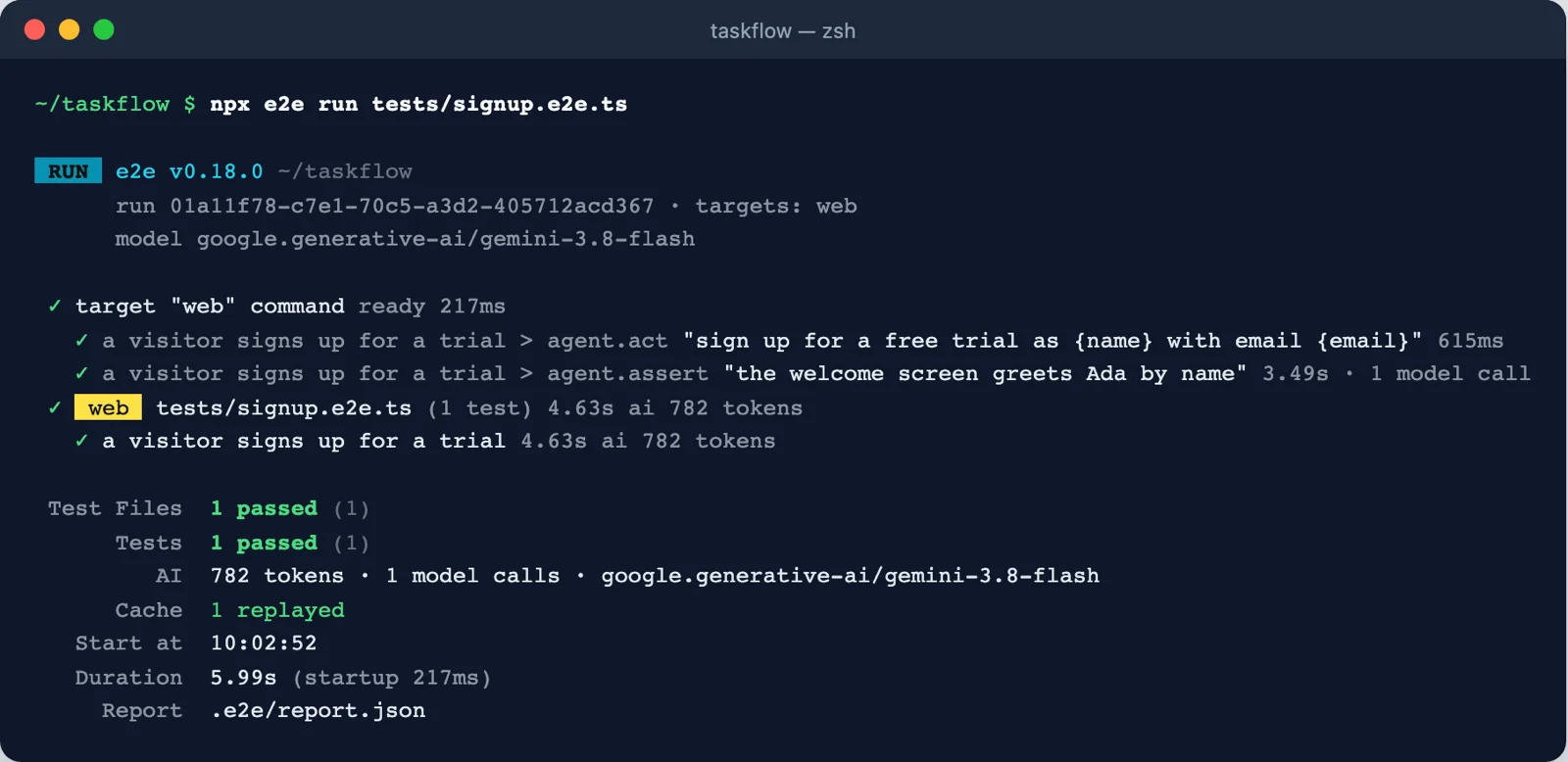
agent.act took 615 ms instead of 10.78 s and made no model call (Cache 1 replayed). The agent.assert still made its one call. Total: 782 tokens, against 15.9k on the first run. Screenshot: course run, e2e 0.18.0.| Summary says | Meaning |
|---|---|
replayed | The recording completed without a model call. |
handed off | Replay started, then the agent took over (the app changed). |
missed | No usable recording; the agent ran the step from the start. |
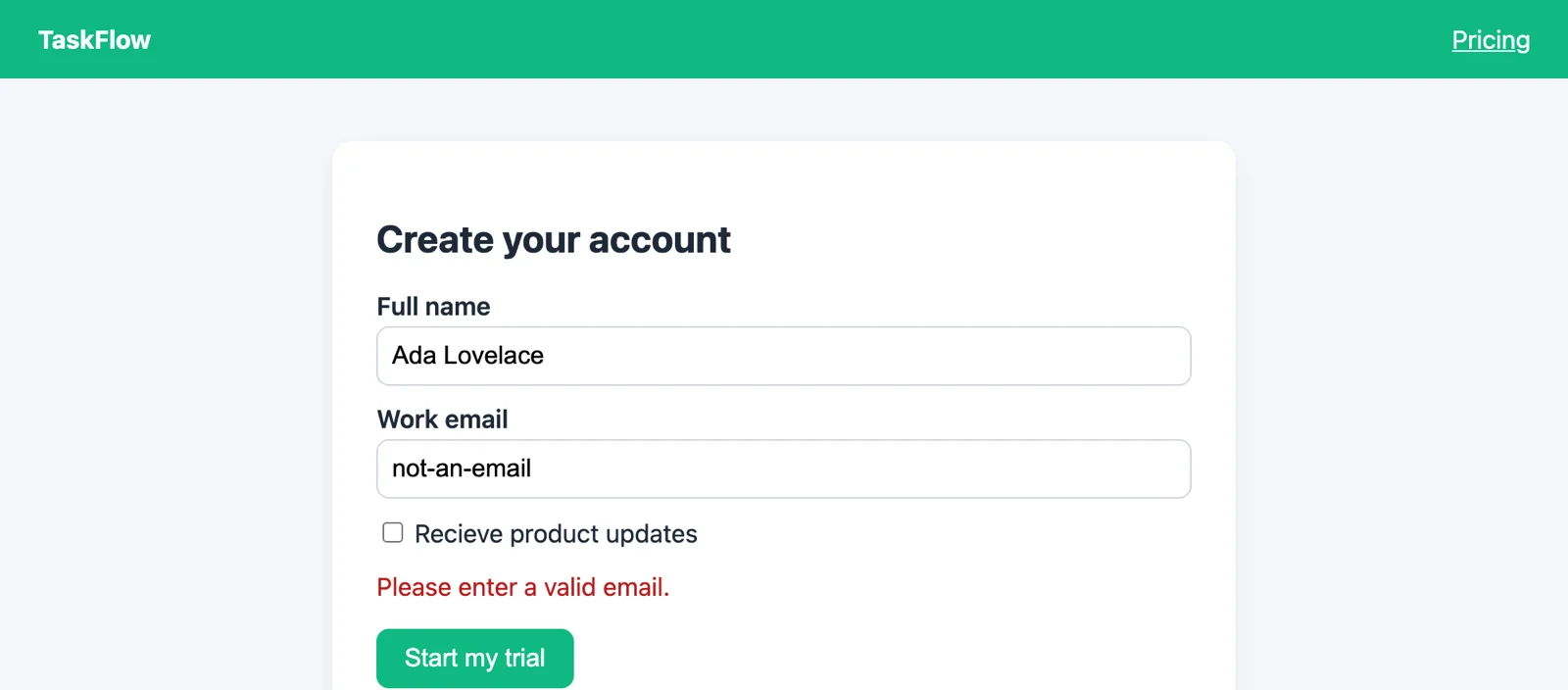
act is cached. assert, waitFor and extract always run live: a judgement that never looked would be no judgement at all.expect.npx e2e run --no-cache. The cache lives in .e2e/cache/, which init adds to .gitignore; committing it is opt-in.The sign-up form shows an error when the email is malformed. We know the exact controls and the exact message, so this test needs no model at all. A beforeEach hook opens the form for every test in the group.
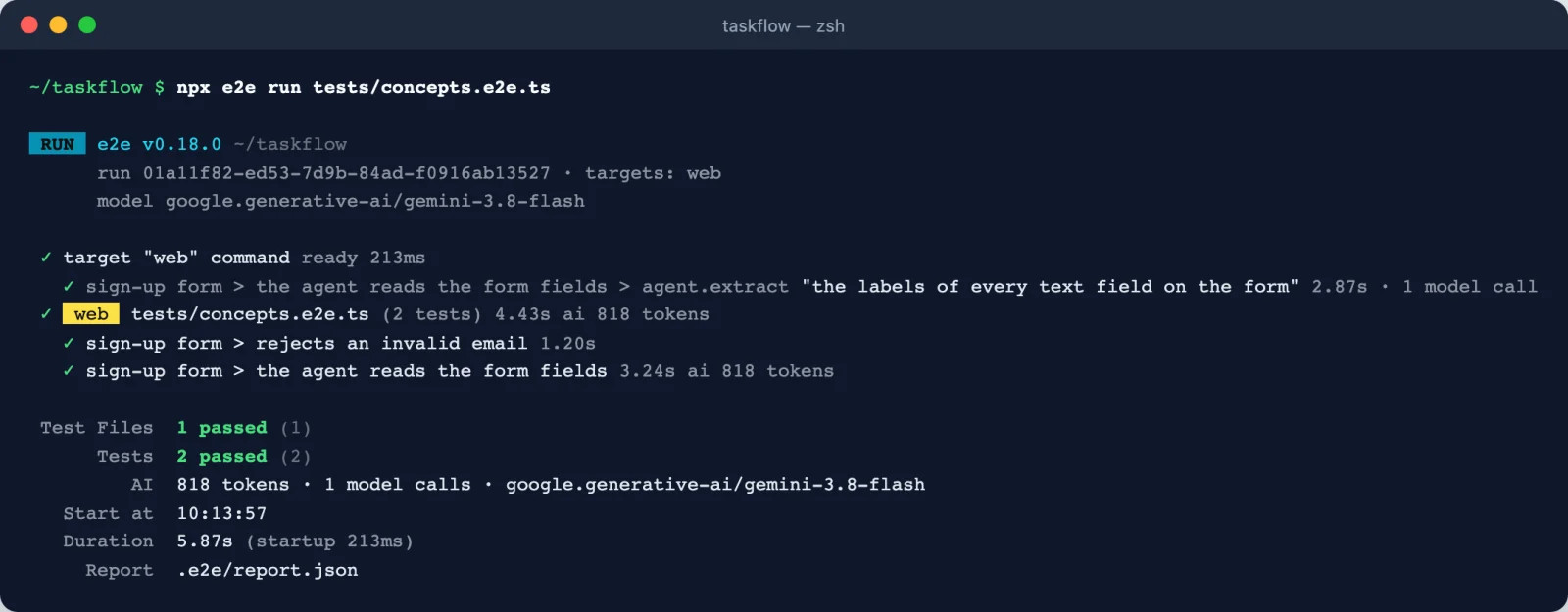
extract made exactly one model call (818 tokens), and plain value matchers checked its result. Screenshot: course run, e2e 0.18.0.About 20 minutes, in the TaskFlow project from Module 1.
Save the file from section 7 as tests/concepts.e2e.ts and run npx e2e run tests/concepts.e2e.ts. Both tests should pass. Note the token count: only the extract test spends any.
Run npx e2e run tests/signup.e2e.ts twice. Compare the agent.act time, the Cache line and the token total between the two runs. Then run it once more with --no-cache and compare again.
Add three tests to concepts.e2e.ts for the empty-name case (submit with only an email):
agent.act goal followed by an expect;agent.act followed by an agent.assert.Run each one twice. Which is cheapest? Which one survives if you rename the button to "Begin trial"?
Change the assertion in signup.e2e.ts to 'the welcome screen greets Grace by name' and run it. Read the error code, then put it back.
The required attribute on the name field means the browser itself blocks submission and shows its own bubble, which is not in the page's accessible tree. A good locator check is therefore that the form is still there and the welcome screen did not appear:
(a) is free and fastest but breaks on a renamed button. (b) costs model calls once, then replays from the cache, and the agent adapts to a renamed button. (c) also adapts but pays for a judgement on every run. In step 4 the judgement fails with ASSERTION_FAILED, because the screen greets Ada.
Pick one answer per question, then check your score.
Answer in your own words first, then open the model answer.
agent.act be followed by an exact check?Two reasons. The check proves the outcome precisely, instead of trusting the agent's own account. And the cache only records a goal once a later check passes, so without it every run pays for the goal again.
agent.assert better than toHaveText?When the check is about meaning rather than exact characters: text written by a model, a greeting that may vary in wording, or "the cart shows two items" across a complex layout. When the exact text matters, toHaveText is cheaper and stricter.
unique()?A cache entry is keyed on the instruction and its params. A value that changes every run would never match, so the step would always miss. unique() tells the cache to record a slot for the value instead of the value itself.
All screenshots are from runs made for this course with e2e 0.18.0. The diagram was drawn for this course.
agent.act), judgements (assert, waitFor, extract) and locators (screen + expect). Only locators never call a model.app, screen, agent, browser/device) and are organised with describe, hooks and options.