Everything the web engine adds on top of the core API: getting the app running, testing several screen sizes, controlling the network, signing in once, checking your API, and catching visual regressions.
Module 03 ~40 min read + lab Web engine (Playwright)browser fixture to mock an API, handle dialogs, catch downloads and reach into iframes.fetch and toMatchSchema, and visual tests with toHaveScreenshot.Prerequisites: Module 2: Core Concepts and the TaskFlow project from the Module 1 lab.
Every test in this module ran on TaskFlow for the course. The viewport, mock and API tests below passed on e2e 0.18.0 without any model calls. Visual comparison needed the 0.19 nightly; section 7 explains why.
A web target needs an app.url. You can start the app yourself, or add app.command and let the runner do it.
app: { url: process.env.APP_URL ?? 'http://localhost:3000' }. Reading APP_URL lets you aim the same suite at a preview deployment without editing the file.
Add command. The runner spawns it, waits until app.url answers (60 s by default, startupTimeout), and stops it when the run ends, fails or is interrupted.
Let the runner pick the port. With port 0 the runner chooses a free port and substitutes it for {port} in the command's args and env. Use 127.0.0.1 (or [::1]); localhost:0 is rejected. Tests read the real address from app.baseUrl.
The command runs without a shell and inherits only PATH, HOME and temp variables, so pass anything else in env. And with Next.js 16 dev servers, add allowedDevOrigins: ['127.0.0.1'] to next.config.ts when the target opens 127.0.0.1, or the page renders but never hydrates.
The browser and the initial viewport are options of the engine; the app belongs to the target. To test several sizes, add one target per size. Every test runs once per target, and targets that declare the same app.command share one server.
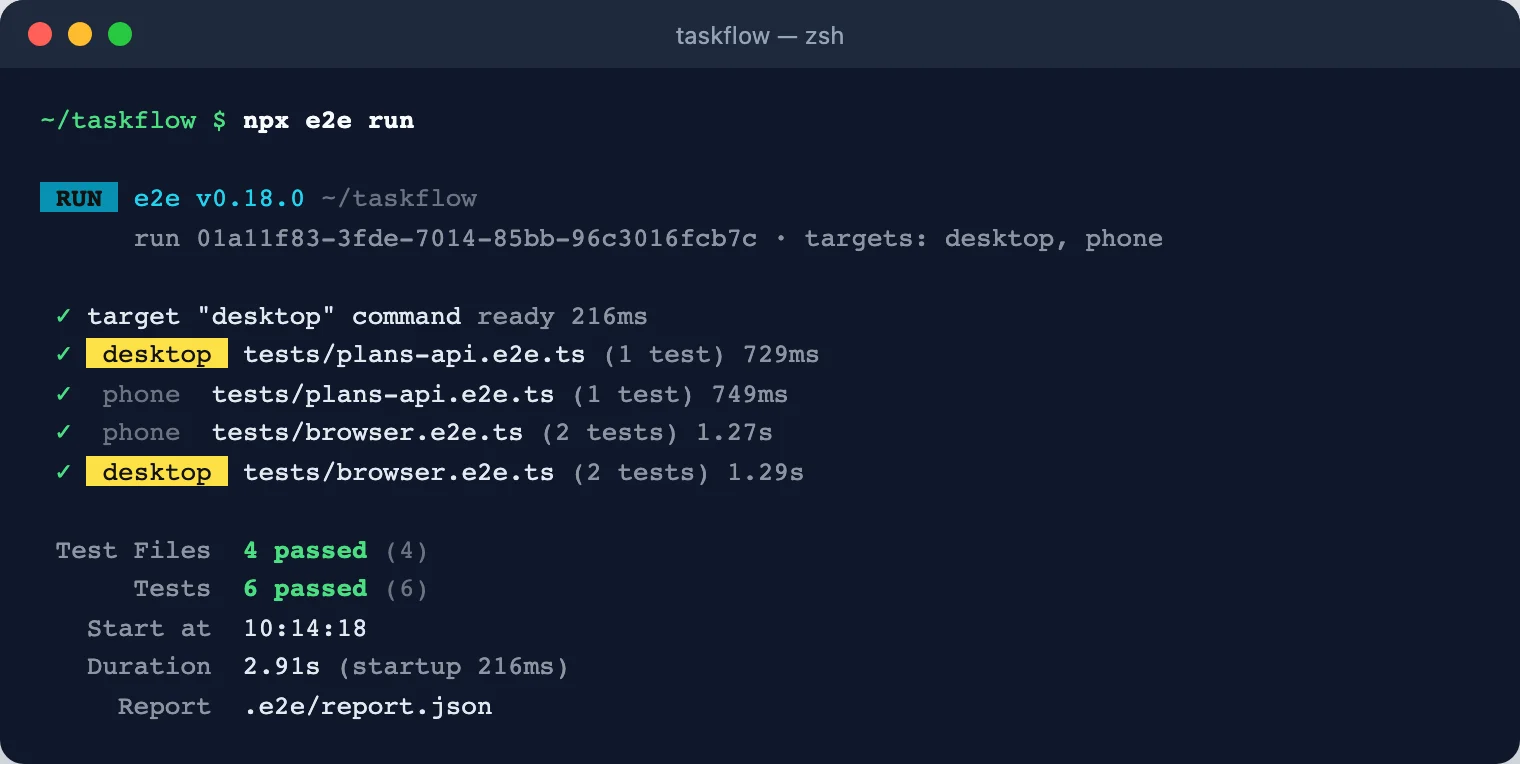
desktop and phone in parallel. No line mentions a model, because none of these tests uses agent. Screenshot: course run, e2e 0.18.0.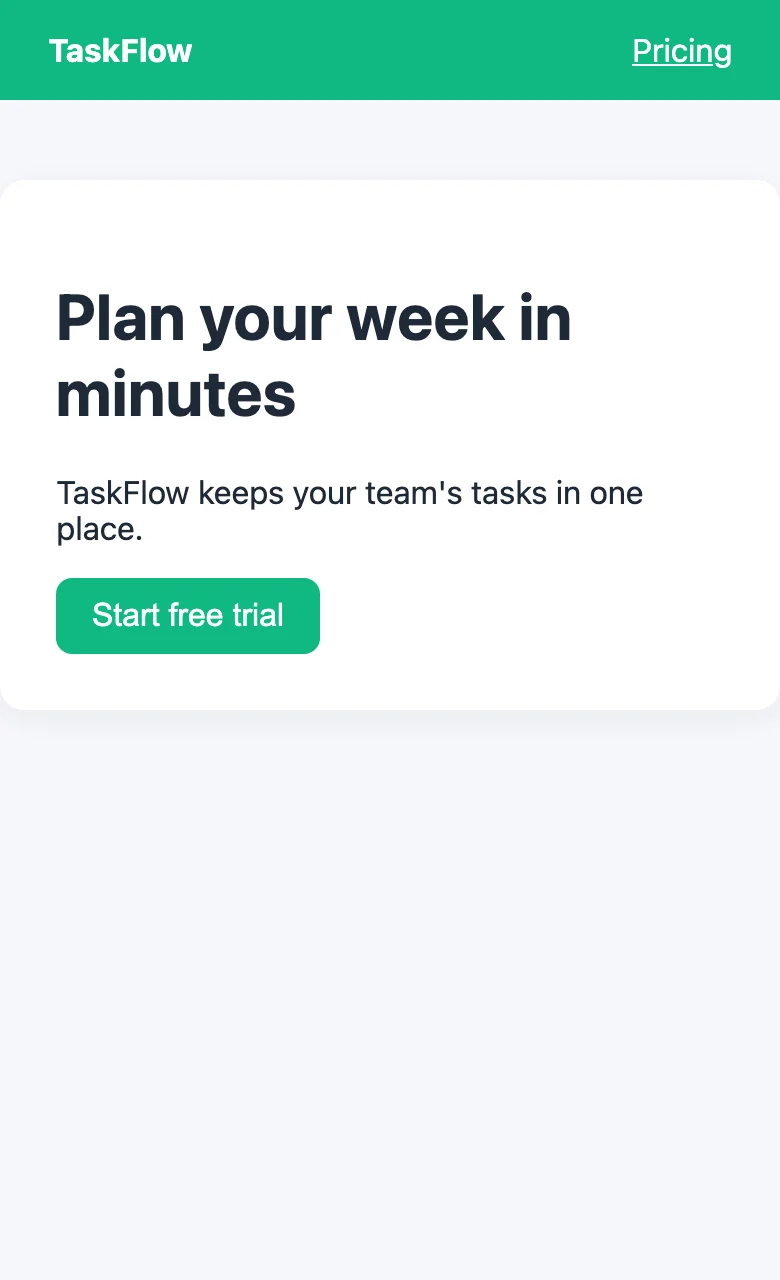
phone target's 390 px width. Screenshot: course demo app.web({ browser: 'webkit', viewport: { width: 390, height: 844 } }). Chromium is the default; Firefox and WebKit need installing first, for example npx @e2e-dev/web install webkit --with-deps in CI.npx e2e run --target phone. See the plan: npx e2e list prints every test and target pair without running anything.await browser.setViewport({ width: 390, height: 844 }), ideally before app.open so the desktop layout never renders. The agent sees the current size but cannot resize the page itself.browser fixturescreen, app and expect work on every platform. For browser-only operations, import test from @e2e-dev/web and take the browser fixture. In a suite that also has device targets, add { requires: ['browser'] } to these tests so they are skipped on phones.
| Task | Call |
|---|---|
| Mock an API | browser.route('**/api/quote', route => route.fulfill({ json: {...} })), registered before app.open. Each handler calls exactly one of fulfill, continue, fallback or abort. |
| Wait for a real response | Promise.all([browser.waitForResponse('**/api/orders'), button.tap()]) |
| Handle a dialog | const off = await browser.onDialog('accept'); … await off(); An unhandled alert/confirm fails the next step. |
| Download a file | const file = await browser.waitForDownload(() => link.tap()); The file is stored as a test artifact. |
| Reach into an iframe | browser.frameLocator('#payment-frame').getByLabel('Card number').fill(...) |
| Read page state | browser.evaluate(() => localStorage.getItem('flag')); the function is serialized, so pass data as the second argument. |
| URL and title | expect(browser).toHaveURL('/dashboard'), expect(browser).toHaveTitle(/Dashboard/) |
| Cookies, init scripts | browser.setCookies([...]), browser.addInitScript(fn, arg) |
TaskFlow's lab adds a static app/api/plans.json. This test replaces the real response before the page opens, then asks the page to fetch it. The page sees only the mock.
Mocks make agent tests reliable too: an agent.act goal against a mocked checkout always sees the same prices, so its cached replay stays valid.
Logging in at the start of every test is slow and spends model calls if an agent does it. Instead, a setup test signs in once and saves a named session (cookies, local storage and IndexedDB). Other tests declare the session and start signed in.
admin.password is an opaque Secret with no .value. You can pass it to fill() or as an agent.act param: the model sees only its name and purpose, the runner types the value, and the value is redacted from model input and reports. After a secret is filled, screenshots are withheld for the rest of the attempt. Sessions last for one run and are encrypted on disk.
The runner always runs the setup a test depends on, even if you select only tests/dashboard.e2e.ts. If the setup fails, its dependants are skipped with cause setup-failed.
API checks live in the same files and run in the same command. A test that takes only app calls no model. Use plain fetch against app.baseUrl and the value matchers; toMatchSchema accepts any Standard Schema (Zod, Valibot, ArkType) and returns the value already typed.
For state the API writes after it answers, expect.poll re-reads until a matcher passes. To call the API as a signed-in user, write a fixture that forwards browser.cookies() with each request (see the API page of the docs).
toHaveScreenshot is documented on the e2e site but is not in the 0.18.0 stable release: there the test fails with expect(...).toHaveScreenshot is not a function. It works in the nightly build we used, 0.19.0-nightly-20261008205824. Install it in a separate branch or project until 0.19 ships:
expect(screen).toHaveScreenshot(name) compares the whole screen with a PNG stored next to the test; expect(locator).toHaveScreenshot(name) compares one element. Each target and operating system gets its own file, because fonts render differently.
Run 1: no baseline. The first run has nothing to compare against, so it writes the screenshot and fails on purpose. Look at the image, commit it, run again. (Our test has two screenshots, so the second run wrote cta the same way; the third run passed.)
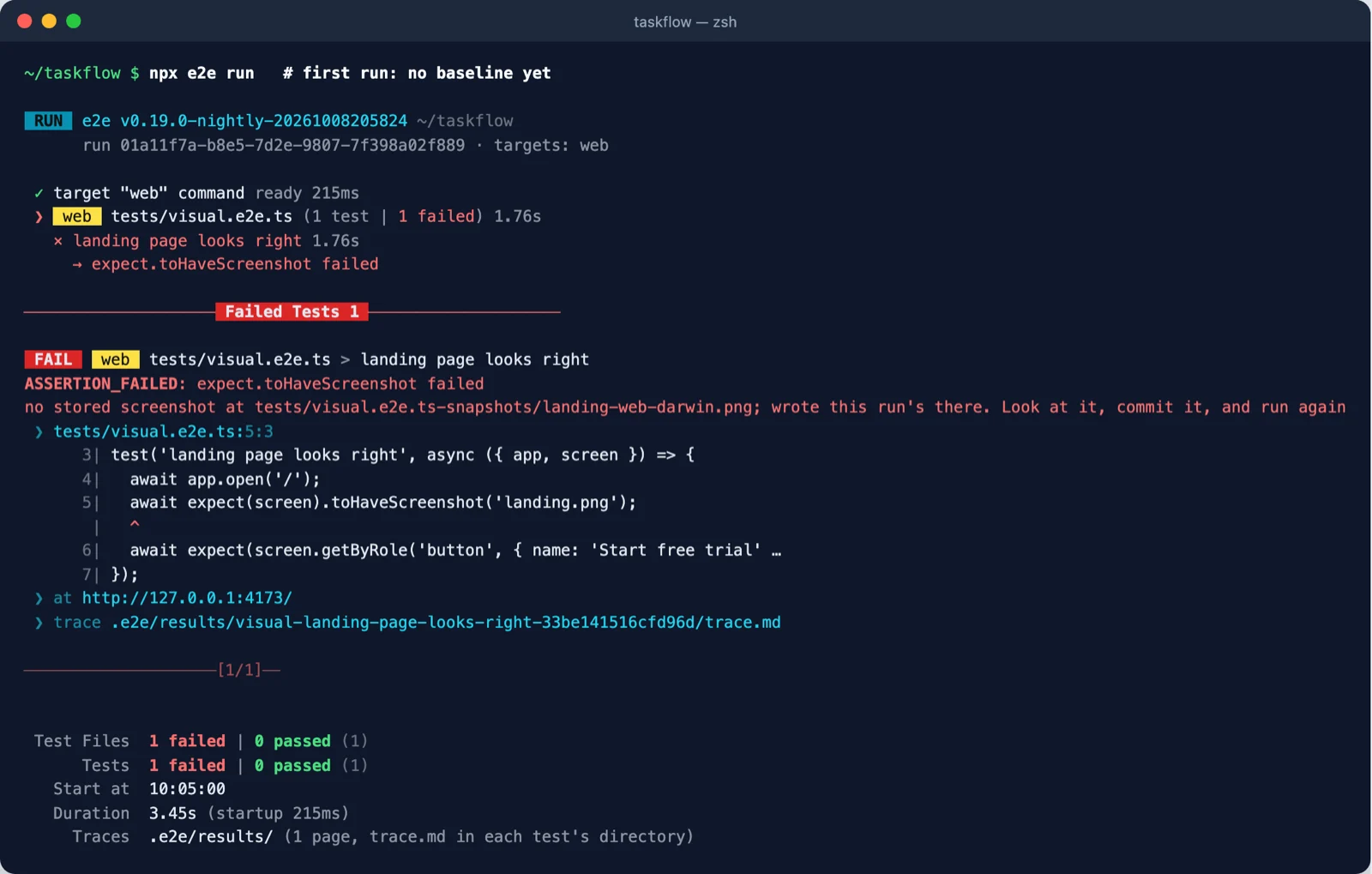
tests/visual.e2e.ts-snapshots/landing-web-darwin.png and asks you to check and commit it. Screenshot: course run, e2e 0.19 nightly.Then we changed one CSS value: the button colour from green to blue. Every functional test still passed. The visual test did not.
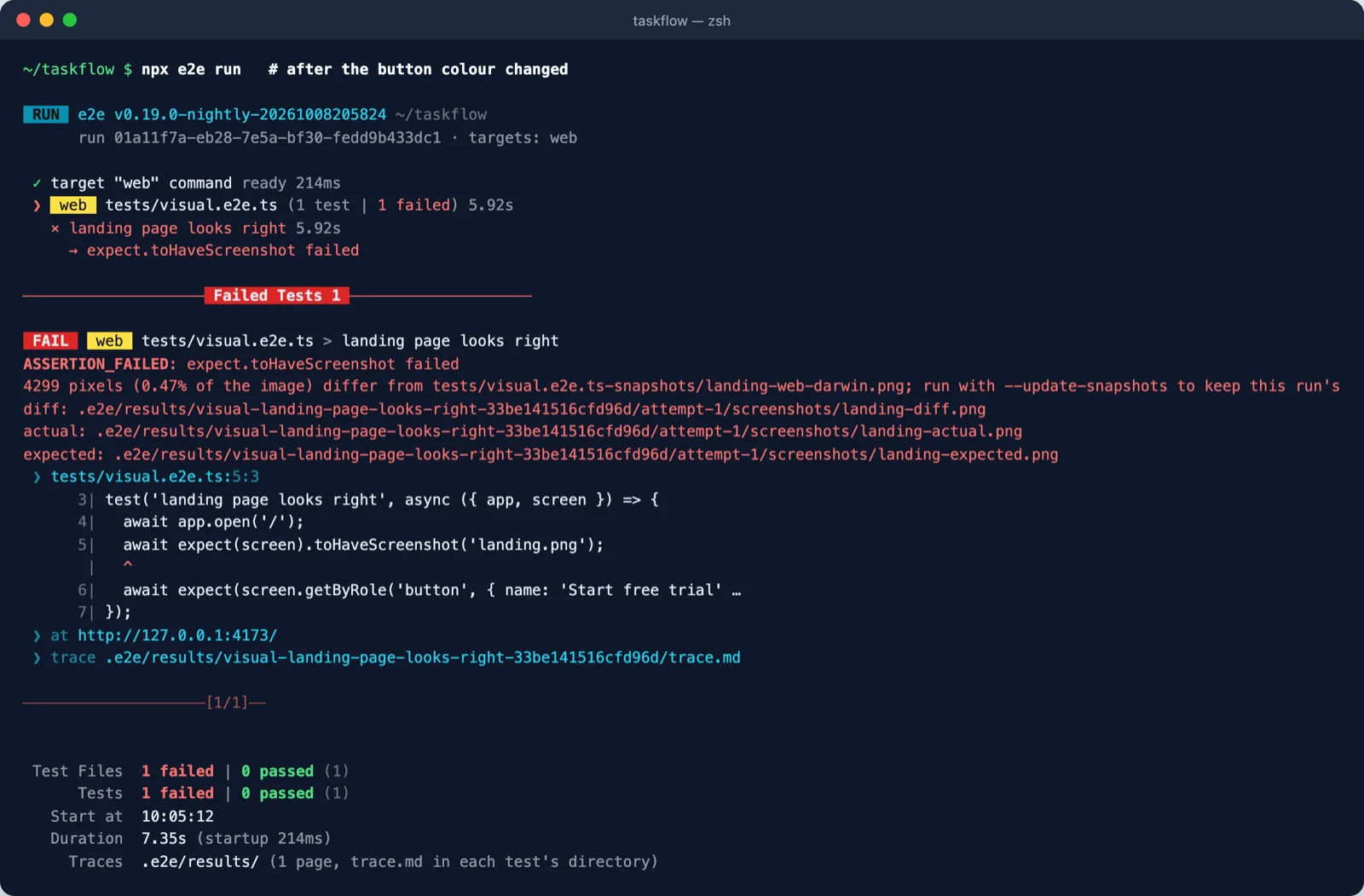
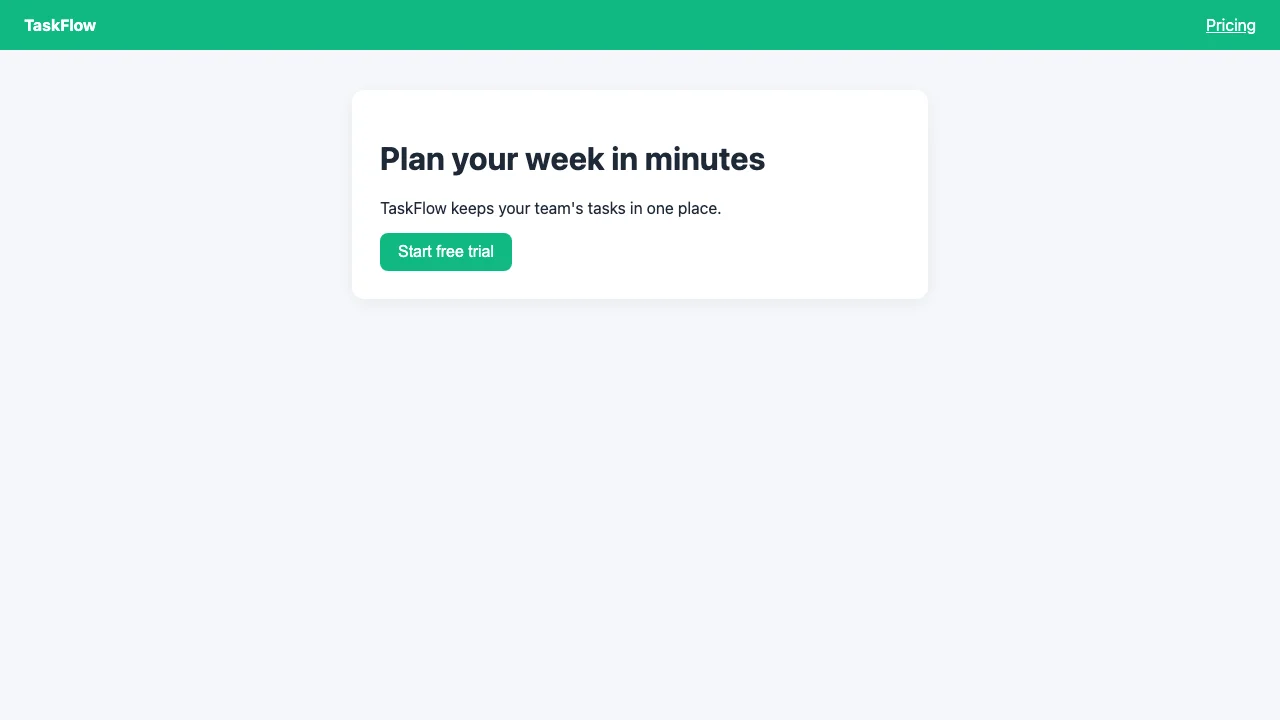
landing-expected.png (baseline)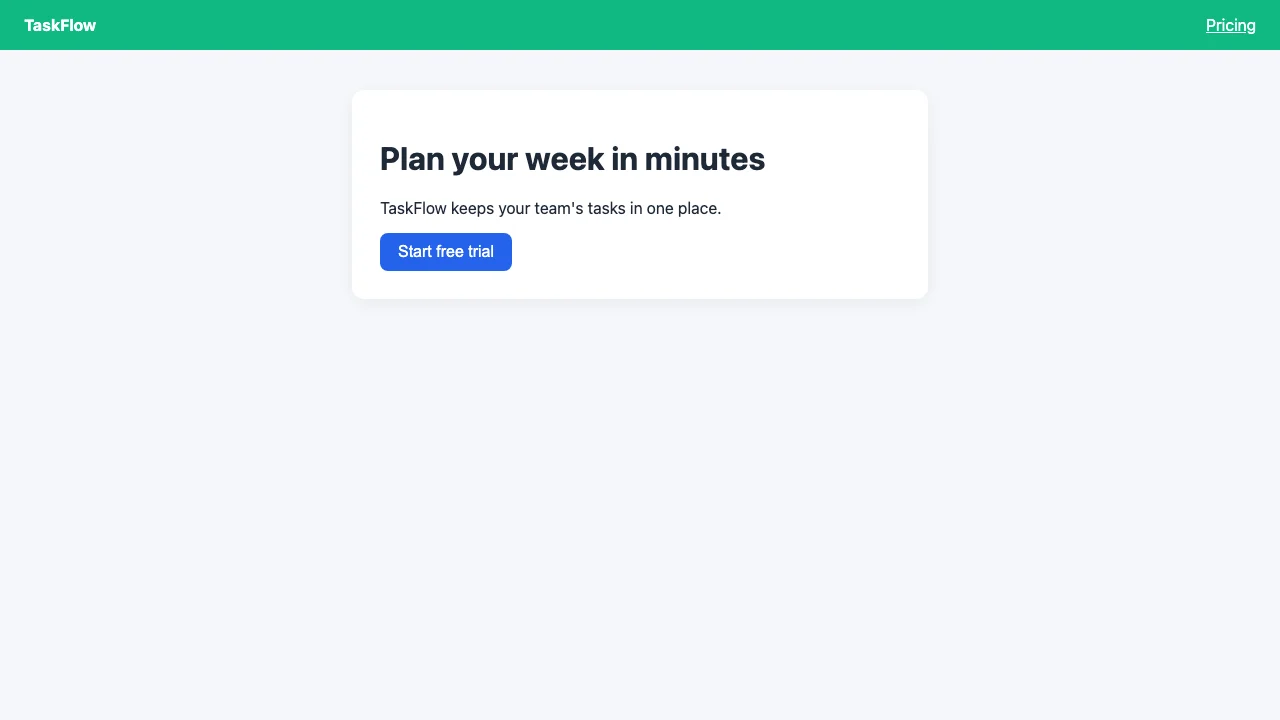
landing-actual.png (this run)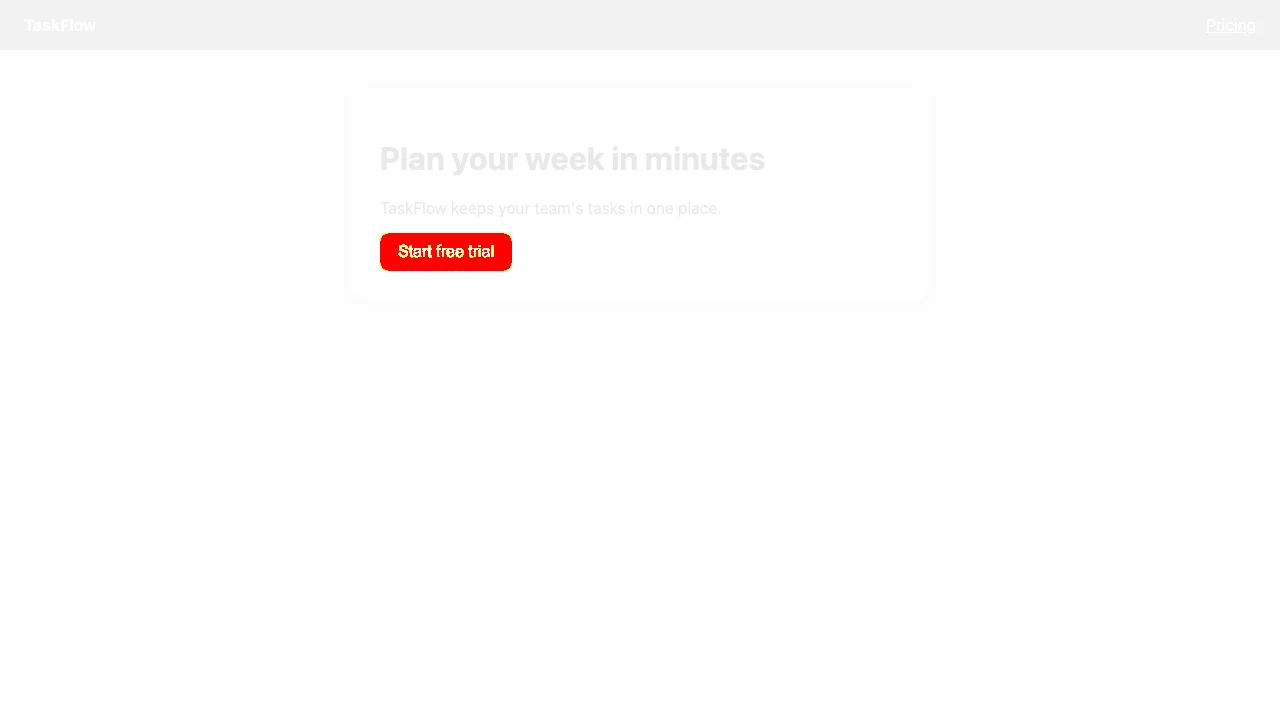
landing-diff.png: changes in redIf the change was intended, accept it with npx e2e run --update-snapshots, review the new PNGs and commit them. To tolerate noise or hide content that changes every run:
| Option | Default | Meaning |
|---|---|---|
threshold | 0.2 | How far one pixel's colour may drift and still count as the same (0 to 1) |
maxDiffPixels | 0 | How many pixels may differ |
maxDiffPixelRatio | 0 | What share of pixels may differ (0 to 1) |
mask / maskColor | none / #ff00ff | Locators painted over before comparing |
On the web, animations are stopped and the text caret hidden before the capture. In CI, baselines must come from the machine that renders them (a Linux runner for web), so generate them there with --update-snapshots and commit the result.
You do not have to switch in one go. @e2e-dev/web ships its own pinned playwright-core, so your @playwright/test stays installed and both runners live in one project. e2e only picks up tests/**/*.e2e.ts, so keep the file patterns apart and move one spec at a time.
| Playwright | e2e |
|---|---|
use.baseURL, webServer | app: { url, command } on the target |
projects | targets |
use.viewport, use.browserName | web({ viewport, browser }) |
use.httpCredentials | web({ basicAuth }) |
project dependencies for sign-in | test.setup + { session } |
page.getByRole(...) etc. | the same on screen; names match the whole string, so add { exact: false } where Playwright matched a fragment |
locator.click() | locator.tap() (click() is an alias) |
page.locator('css'), page.frameLocator | browser.locator('css'), browser.frameLocator |
reporter: 'html' | no equivalent yet; .e2e/report.json every run, markdown reporter for a summary |
A good first candidate is a flow whose steps change often, such as a wizard or checkout: keep navigation and final assertions deterministic and replace the brittle middle with one agent.act goal. The docs' migration page also offers a ready-made prompt that has a coding agent do this one spec at a time.
About 20 minutes, using your Module 1 project. No model key is needed for steps 1 to 4.
Create app/api/plans.json:
Change targets in e2e.config.ts to the desktop + phone pair from section 2 (keep your agents block and port). Run npx e2e list and check every test now appears twice.
Add tests/browser.e2e.ts (section 3) and tests/plans-api.e2e.ts (section 5). Run npx e2e run tests/browser.e2e.ts tests/plans-api.e2e.ts: six passes.
Change "Team" to "Teams" in plans.json and rerun. Read the failure, then put it back. Run only the phone with --target phone.
In a copy of the project, install the nightly, add tests/visual.e2e.ts from section 6, run until it passes, change the button colour in app/index.html, and open the -diff.png. Then accept or revert.
Both targets fail the API test at the last assertion, with ASSERTION_FAILED: expected ["Free","Teams","Business"] to equal ["Free","Team","Any<String>"] (that is the exact message from our run). The schema check still passes, because the shape is fine; only the content changed. That is the point of having both a schema assertion and a value assertion.
Pick one answer per question, then check your score.
Answer in your own words first, then open the model answer.
Two checkouts or two CI jobs on one machine would fight over a fixed port. With http://127.0.0.1:0 the runner picks a free port, substitutes it for {port}, and tests read it from app.baseUrl. Cache entries stay valid when the port changes.
session.save()?Because save() stores whatever state exists, signed in or not. Without the check, a broken login would be saved and every dependent test would fail later with a confusing error.
When the bug is in how something looks rather than what it says: a colour, a layout shift, an overlapping element. Locator assertions would still pass in those cases, as our blue-button run showed.
node_modules/e2e/docs), used to confirm which features exist in the stable release.All screenshots are from runs made for this course on 9 October 2026.
app.command starts and stops the app; port 0 with {port} avoids conflicts.browser fixture handles mocks, dialogs, downloads, iframes, cookies and page state.Secret handles the model never sees.fetch + toMatchSchema in the same run, with no model.toHaveScreenshot (0.19 nightly) catches visual changes; accept intended ones with --update-snapshots.