Run the same kind of test on a simulator, an emulator or a real phone: set up the device, point e2e at your app, and learn what changes when there is no URL bar.
Module 04 ~40 min read + lab iOS & Androidnpx agent-device doctor.mobile({ platform }), bundleId and appPath.app, screen, agent, expect and the device fixture.Prerequisites: Module 2 (locators, goals, assertions) and the project from Module 1. For the lab you need either Xcode with an iOS simulator runtime (macOS only) or the Android SDK with an emulator (macOS, Linux, or Windows via WSL).
The Android screenshots come from a real run on a Pixel 3a (API 34) emulator with e2e 0.18.0 and @e2e-dev/mobile 0.10.0. The Mac we used had no Xcode simulator, so the iOS steps in this module follow the official docs; the API is the same on both platforms.
The web engine drives a browser through Playwright. The mobile engine, @e2e-dev/mobile, drives devices through agent-device, an open-source tool from Callstack that can read a device's accessibility tree, tap, type and swipe. Your test talks to e2e; e2e talks to the agent-device daemon; the daemon talks to the simulator, emulator or phone.
| Platform | You need | Notes |
|---|---|---|
| iOS | macOS, Xcode, and an iOS simulator runtime (Xcode → Settings → Components) | Command Line Tools alone are not enough: there is no simctl without full Xcode. |
| Android | Android SDK with an emulator image (Android Studio → Device Manager) | Export ANDROID_HOME (on macOS usually ~/Library/Android/sdk) and put platform-tools on PATH so adb works. |
| Both | Node.js 24.8+ (or 22.22.3+), e2e and @e2e-dev/mobile | npm install -D e2e @e2e-dev/mobile, or choose Mobile (iOS/Android) in npx e2e init. |
Before writing a single test, ask agent-device what it can see:
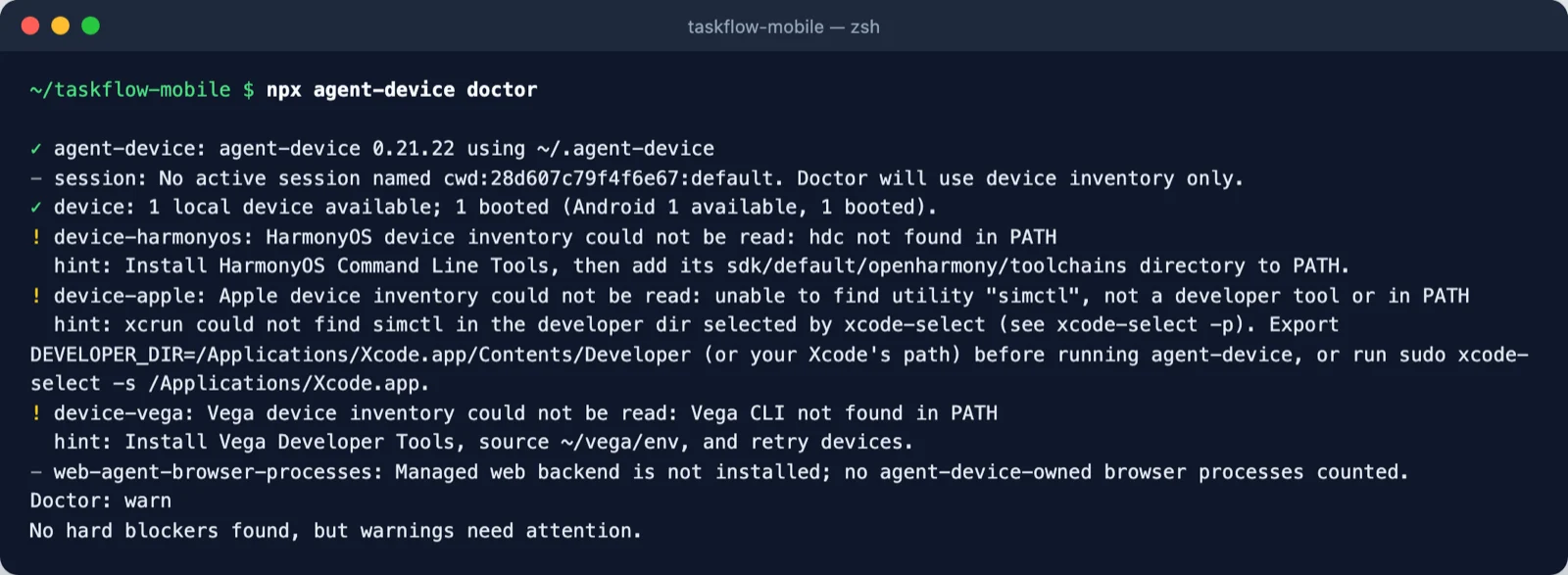
Every warning comes with a hint: line that tells you exactly what to install or export. Fix only the platform you plan to test; warnings for others are harmless.
A mobile target replaces web() with mobile({ platform }) and replaces the URL with the app's identity. This is the exact config of our Android run. We tested the built-in Settings app, so every emulator already has it installed:
The iOS version, as generated by the wizard, uses the bundle id Settings:
| Key | Meaning |
|---|---|
app.bundleId | The iOS bundle id or Android package that app.open(), app.restart() and app.clearState() launch. |
app.appPath | A build to install: an iOS simulator .app or an Android .apk. The engine installs nothing on its own; call device.installApp() (no argument installs appPath), for example in a fixture. |
workers: 1 | One worker per device. Two workers never share a device. |
The first test is purely deterministic. The second hands navigation to the agent and lets the model judge the result. Note the imports: test comes from the engine package, expect from e2e.
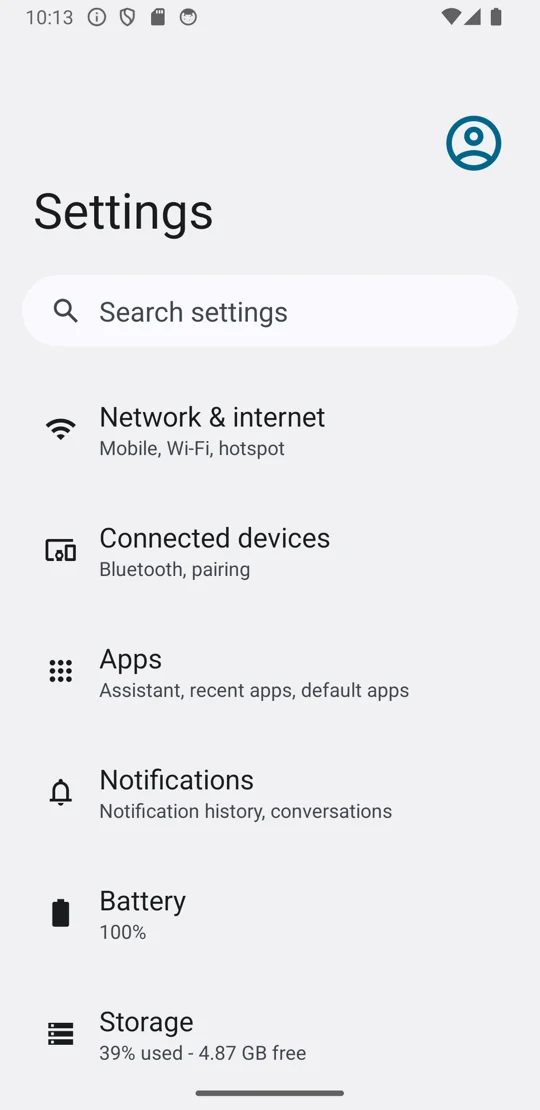
app.open() shows: the Settings home with "Network & internet", the text the first test checks. Screenshot: Pixel 3a emulator.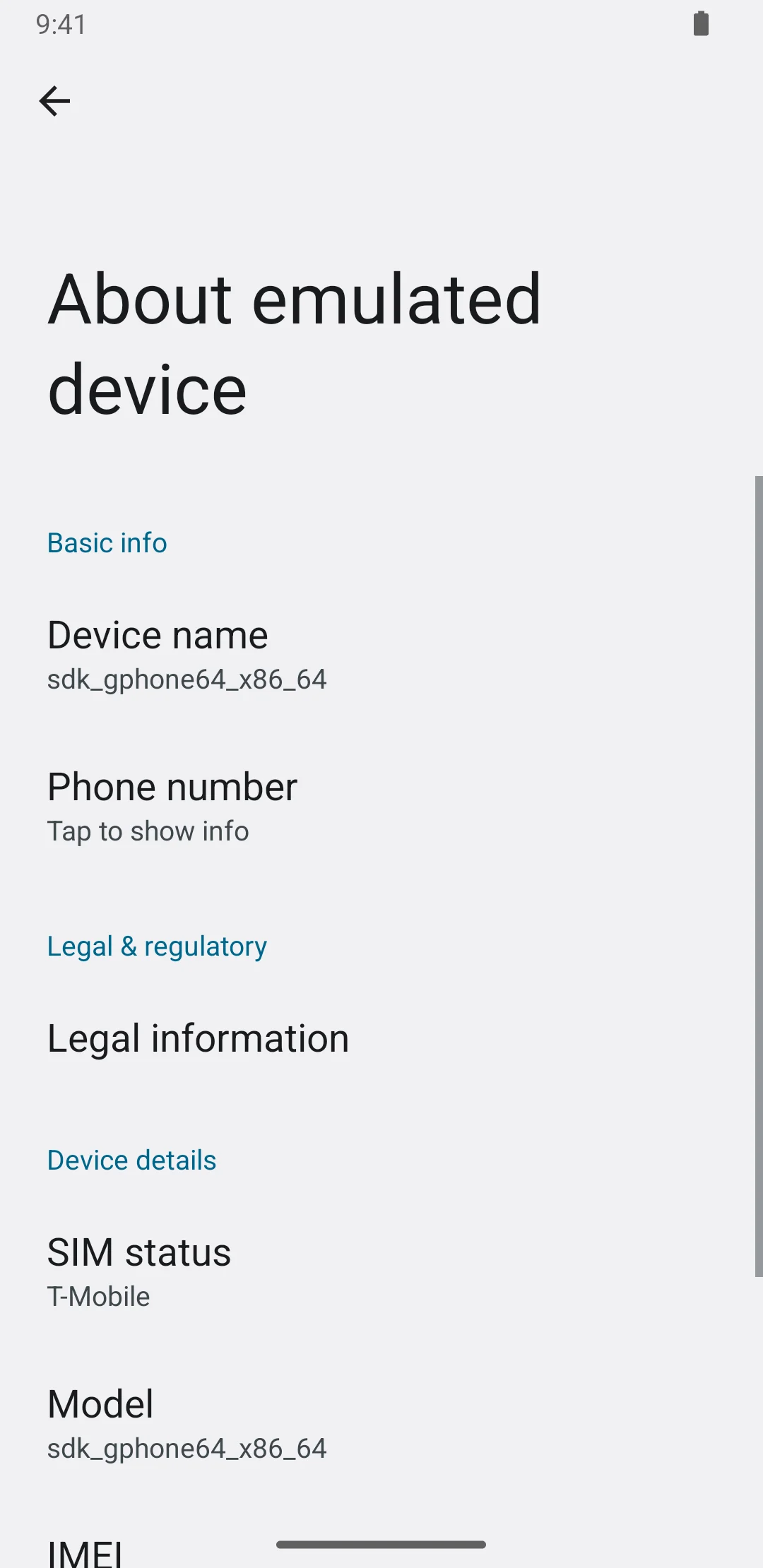
agent.assert saved this capture as evidence. Screenshot: course run artifact.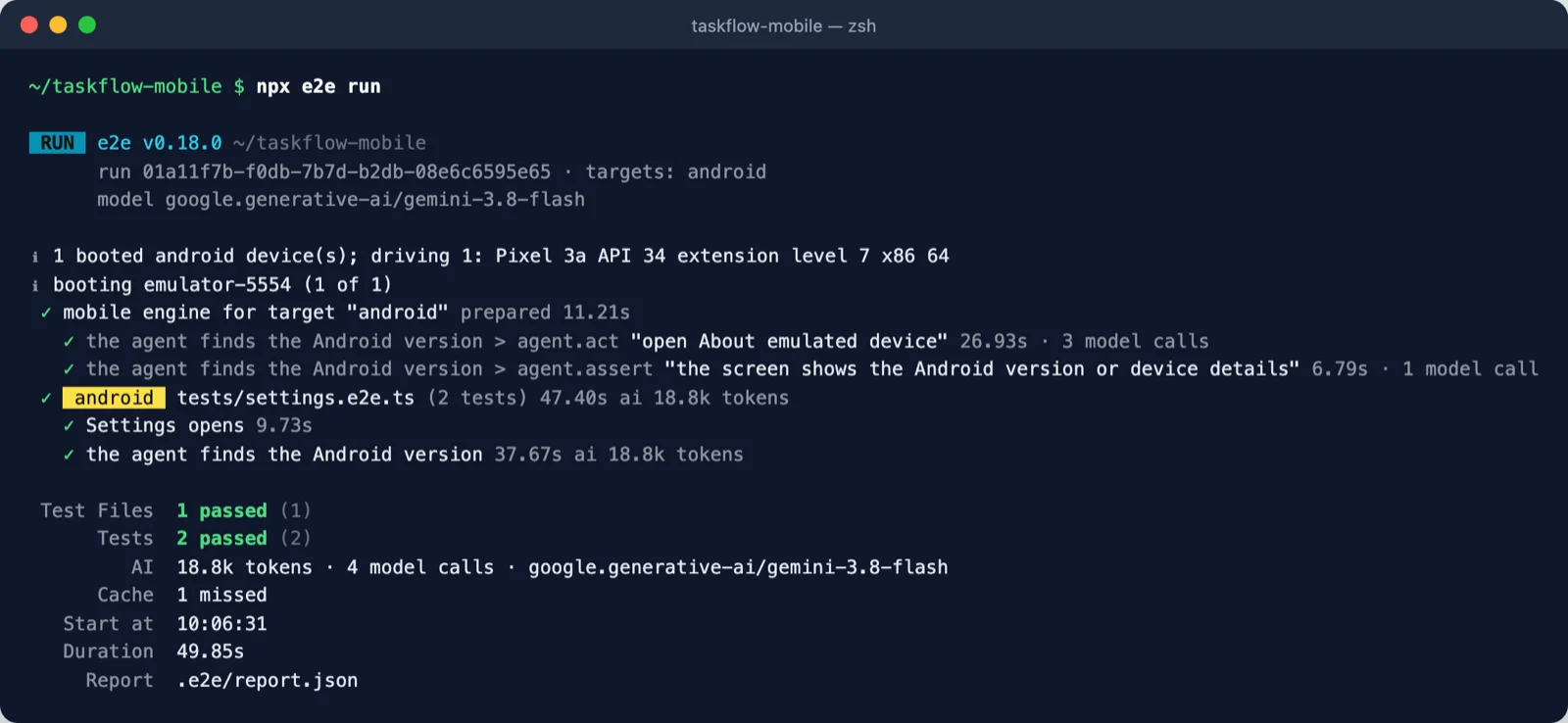
Device runs are slower than browser runs: here about 50 seconds for two tests, against a few seconds on the web. That is one more reason to keep agent steps short and let the cache (Module 2) replay them.
device fixture, launch arguments and permissionsOn a device, screen maps native controls to common roles such as button, textbox, listitem and switch, and getByTestId reads the native id (the accessibility identifier on iOS, the resource id on Android). For everything else there is the device fixture: network, appearance, permissions, installs and deep links, all without a model call. This example from the docs runs on iOS:
Launch arguments and permissions are set on the target's app and apply to every fresh launch, so no permission prompt interrupts the test:
One test can launch with its own settings, and deep links open a route directly:
| Framework | Set the test id with |
|---|---|
| React Native / Expo | testID |
| SwiftUI | .accessibilityIdentifier() |
| Jetpack Compose / Compose Multiplatform | Modifier.testTag(), plus testTagsAsResourceId = true on a root composable for Android |
| Flutter | Semantics(identifier:), wrapped in MergeSemantics for buttons |
Add a target per platform; each test runs on both. Use platforms: ['ios'] or ['android'] on tests whose labels differ.
To run files in parallel, give a device pool and set workers to at least its size: mobile({ platform: 'ios', device: ['iPhone 17', 'iPhone 17 Pro'] }). Without device, the engine uses booted devices up to the worker limit, and boots one if none is running (in our run it found emulator-5554 already booted).
agent-device drives a plugged-in phone the same way. List devices with npx agent-device devices --platform ios and name the phone: mobile({ platform: 'ios', device: 'QA iPhone' }). Use a unique name, not an id.
device in adb devices. A phone's localhost is the phone itself, so forward your dev server with adb reverse tcp:<port> tcp:<port>.AGENT_DEVICE_IOS_TEAM_ID plus AGENT_DEVICE_IOS_BUNDLE_ID set so agent-device can sign its runner. Device settings such as app.permissions and app.clearState() are simulator-only on an iPhone.A device can also be a device provider that leases hosted devices for the run. For EAS Simulators (limited access at the time of writing) install @e2e-dev/eas and pass device: easSimulators({ buildId: process.env.EAS_BUILD_ID }) to mobile(). Tests and CI stay the same, and the machine running e2e needs no Mac, Xcode or Android SDK.
| On the web | On a device |
|---|---|
app.open('/path') | No URL. app.open() launches bundleId fresh; device.openLink(url) opens a deep link. |
Sign in once with test.setup and reuse the session | Not available: sign in per test, or seed the app. |
--video writes a WebM | --video writes an MP4 of the device screen with taps shown. |
| Cache keyed on the page path | Cache keyed on <bundle id> / <screen title>. |
selectOption, setInputFiles, scrollIntoView | Unsupported; use taps and swipes. |
Between tests the app stays where the last one left it, so start each test with app.open(). For CI, a mobile job does four things: build the app (a Release simulator .app or .apk), boot a device, install the build, and run npx e2e run. iOS needs a macOS runner; Android needs Linux with KVM. Module 5 shows a GitHub Actions workflow.
The e2e repository has ready-to-run mobile examples for Expo, SwiftUI, Jetpack Compose, Kotlin Multiplatform and Flutter, each with the same three locator tests on a greeting screen.
About 20 minutes. Choose Android (any OS) or iOS (macOS with Xcode).
Start an emulator from Android Studio's Device Manager, or a simulator from Xcode. Then run npx agent-device doctor and fix any hint for your platform.
Copy the config from section 3 and the test file from section 4. On iOS use platform: 'ios', bundleId: 'Settings', check for 'General' instead of 'Network & internet', and ask the agent to "go to General, then About".
Run npx e2e run twice. Compare the duration and model calls of the second run with the first. Then add a third test that uses only screen and expect to open one more menu item with .click().
The second run should replay the verified agent.act from the cache (look for replayed on the summary's Cache line), so it is faster and uses fewer tokens; agent.assert still calls the model. A deterministic third test has this shape:
Labels differ between Android and iOS versions and languages, so read them off your own device rather than copying them. If a locator fails, the screen.txt written for the failed attempt lists every node the engine saw, with its role and name (Module 5).
adb devices / xcrun simctl list devices booted.simctl not found: install full Xcode and run sudo xcode-select -s /Applications/Xcode.app.npx agent-device daemon stop, then run again. The daemon also keeps the environment it started with, so stop it after changing ANDROID_HOME.Pick one answer per question, then check your score.
Answer in your own words first, then open the model answer.
app.open()?Between tests the app stays where the previous test left it. app.open() launches the target's app fresh, so each test starts from a known screen and the cache's screen-title anchor matches.
getByTestId instead of getByText on mobile?When visible text changes with language, data or OS version, or when two elements share the same text. A test id (testID, accessibilityIdentifier, testTag, Semantics(identifier:)) is stable and set by the developers for testing.
Permissions in app.permissions are set before launch, so no system prompt appears. That is faster, costs no model calls, and makes the test deterministic.
Terminal and emulator screenshots are from runs made for this course on an Android emulator (Pixel 3a, API 34). The diagram was drawn for this course.
@e2e-dev/mobile drives iOS simulators, Android emulators and real phones through agent-device, with the same app, screen, agent and expect API as the web.npx agent-device doctor before writing tests.bundleId; appPath plus device.installApp() installs a build.device fixture, launch arguments and permissions control the device without model calls.app.open().