Send an agent to hunt for bugs, prove what it finds with failing tests, read the evidence a failed run leaves behind, and make the suite run on every pull request.
Module 05 ~45 min read + capstone TypeScript + YAMLe2e explore with a good goal and read its findings, assessment and exit code.--headed, --video, --debug, --ai-trace, --no-cache, --last-failed.Prerequisites: the TaskFlow project from Module 1 and the test vocabulary from Module 2. A GitHub account for the CI section.
So far you have told the agent exactly what to do. e2e explore turns that around: you give a goal, not a test file. The agent plans a step, operates the app, records findings, and repeats until the goal is covered or a budget runs out. Then it writes an assessment. It uses the same model, tools and action rules as agent.act(), and a failed step does not stop the run.
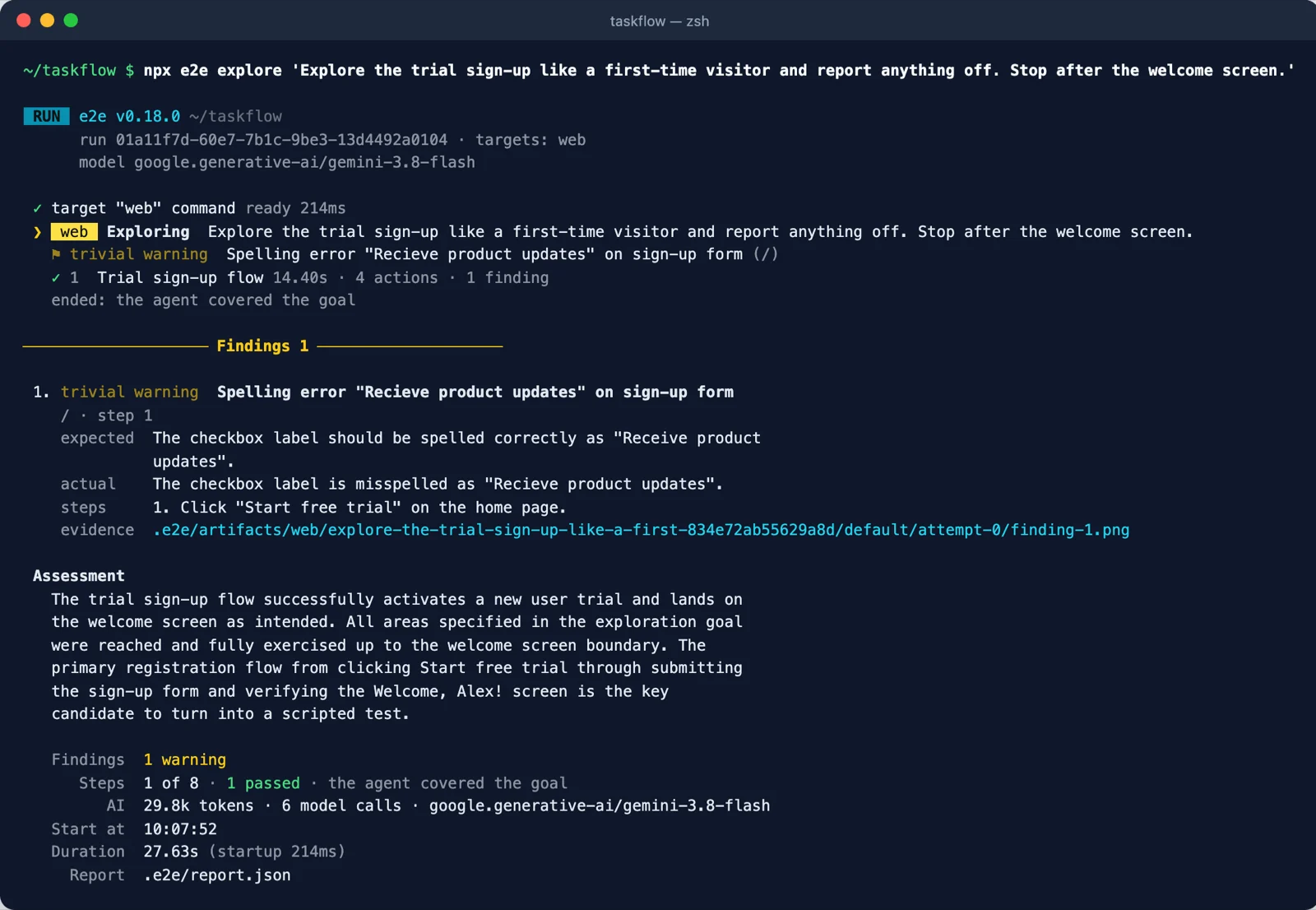
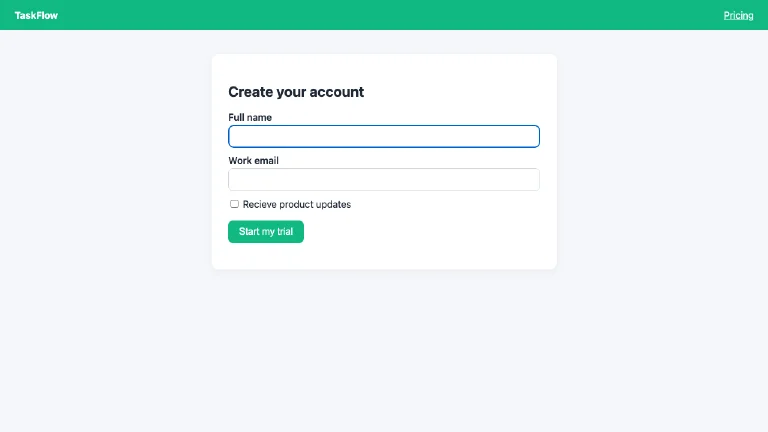
.e2e/artifacts/web/explore-…/attempt-0/finding-1.png. Always compare a finding with its evidence before acting on it. Screenshot: course run.Name the flow and the user: "Explore checkout as a first-time buyer and check that totals match the cart." Add limits such as "stop before placing the order".
An issue fails the run with exit code 1. A warning (like our typo) does not. The report lists the most severe issues first.
--max-steps (1–12) and --timeout (3–15 minutes) cap the cost. Our run used 6 model calls and about 30k tokens.
A finding is a claim; a test is proof. Turn each real finding into a test that asserts the expected behaviour. It fails now, and passes once the bug is fixed, so the bug cannot quietly come back:
A bug bash runs many explore sessions at once. You give your coding agent one prompt, such as "Bug bash the checkout and account settings on this branch." Following the e2e skill, it writes 5–10 one-sentence charters (first-time user, numbers and copy, edge input, state after reload, error paths) and runs one e2e explore per charter, four at a time. Then it merges the findings and rejects those with a known cause. For each finding left, it writes a repro test. A finding counts as a bug only when its test fails with ASSERTION_FAILED. Repro tests are tagged bugbash; keep them out of the merge gate with npx e2e run --exclude-tag bugbash. The full procedure is in npx e2e guide bug-bash.
Each charter can use its own persona: a named entry under agents in the config with its own model, system prompt (how the agent should behave) and context (what your app calls things). Select one with --agent:
Agents do not inherit from each other: give every entry the model and context it needs. npx e2e run --agent buyer,admin tests/checkout.e2e.ts runs the same test once per persona.
In Module 2 you met this test. It expects the wrong error text, so it fails. It is all locators, so it needs no model, which makes it a cheap way to practise reading failures:
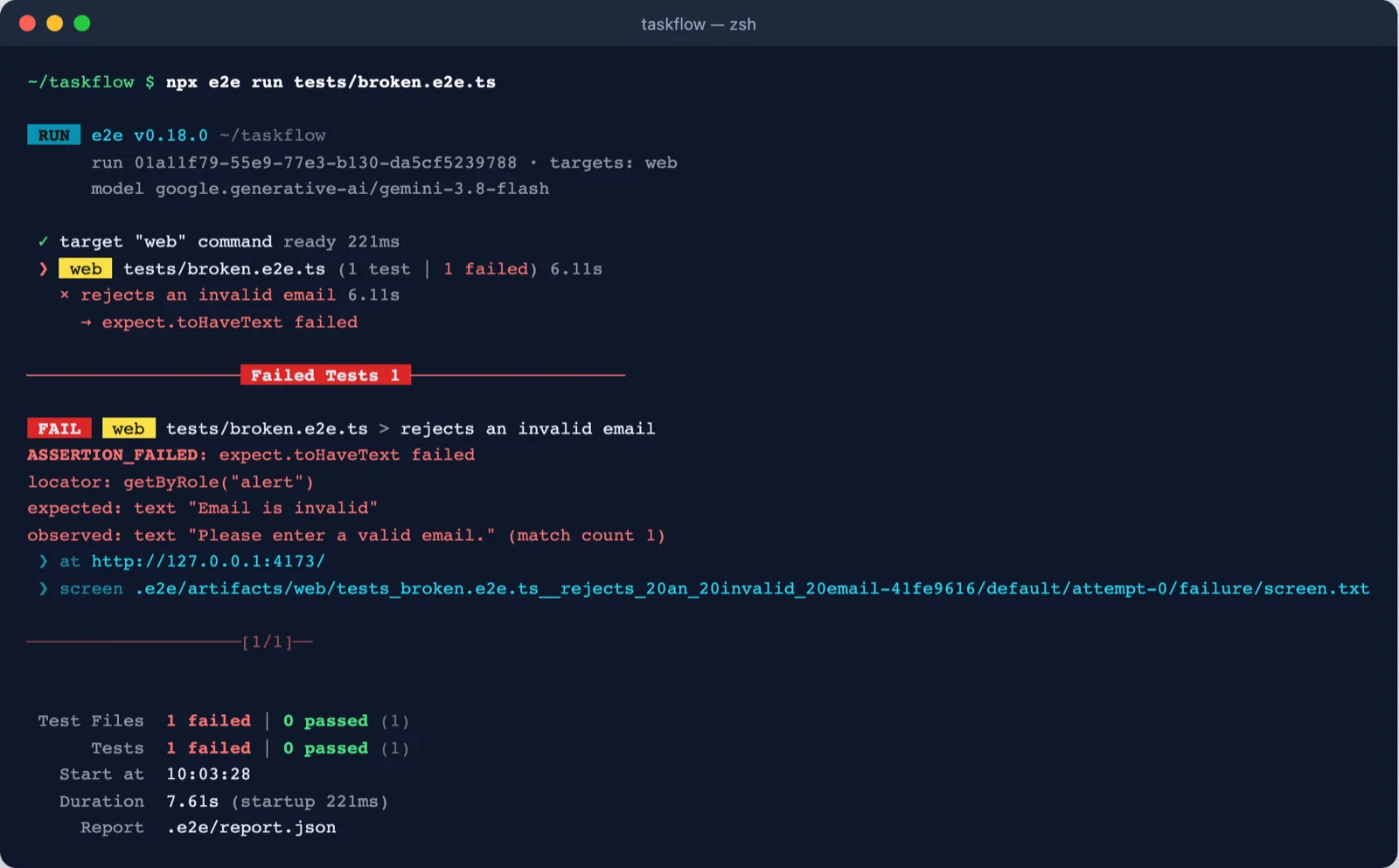
Read it top to bottom. ASSERTION_FAILED means the app was reachable and the locator matched (match count 1), but the text differs. So the app is fine; the test is wrong. If the locator had matched nothing you would see observed: no node, which points to a wrong role or name, or to a step that never happened. We hit exactly that while writing this course: with type="email" on the input, the browser's own validation blocked the submit, so no alert ever appeared.
| Exit | Meaning | Retry the CI job? |
|---|---|---|
| 0 | Every selected test passed, was flaky, or was skipped | — |
| 1 | A test failed or timed out (for explore: an issue was reported) | Only if the test is flaky |
| 2 | CLI, config, or agent policy error | Fix the reported problem first |
| 3 | Engine, app process, model provider, or artifact failure | If the cause is temporary |
| 4 | Internal runner error | Report it |
| 130 | Interrupted (Ctrl-C or a CI signal) | — |
Screen at failure. This is the accessibility tree the agent reads, one node per line (#id role "name" [states]). It is the fastest way to see what the page really offered: here the alert is present, with different text.
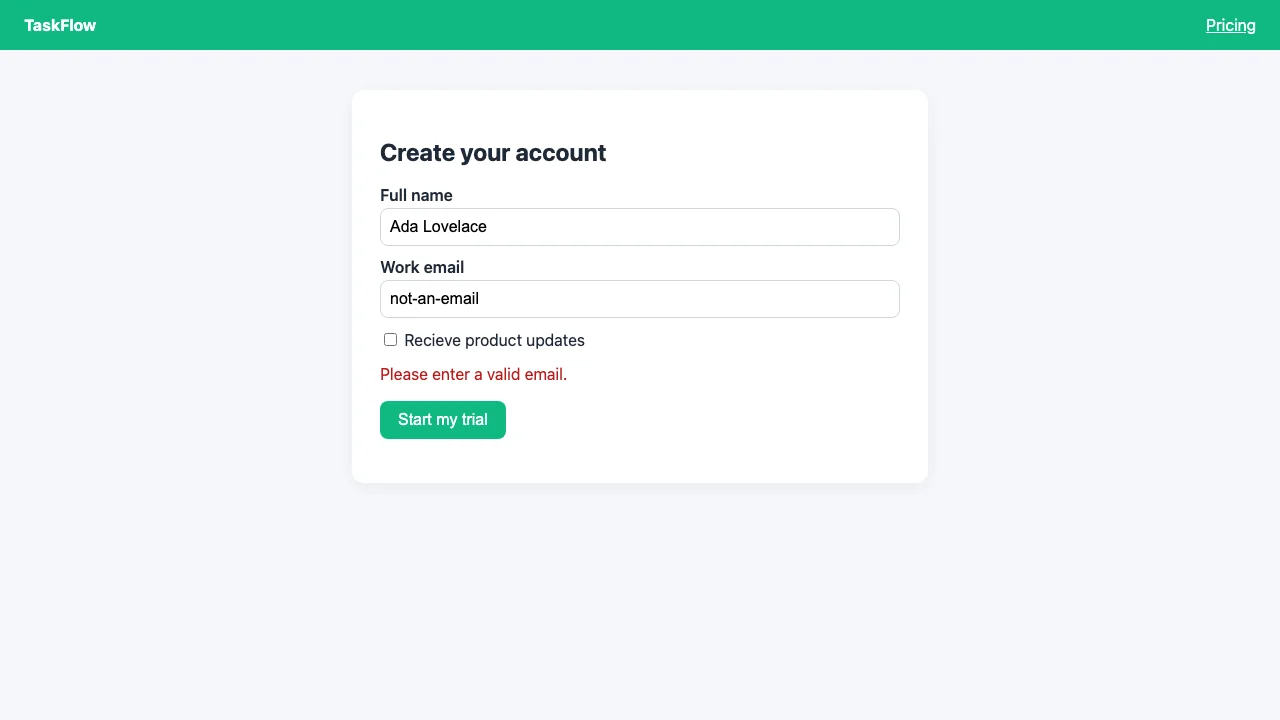
screenshots/001-failure.png).Playwright trace. On the web engine, a failed attempt also keeps a Playwright trace, trace/trace.zip. Open it with npx playwright-core show-trace <path>/trace.zip (or drop it on trace.playwright.dev) to scrub through a filmstrip and see every action with before and after snapshots, console output and network calls.
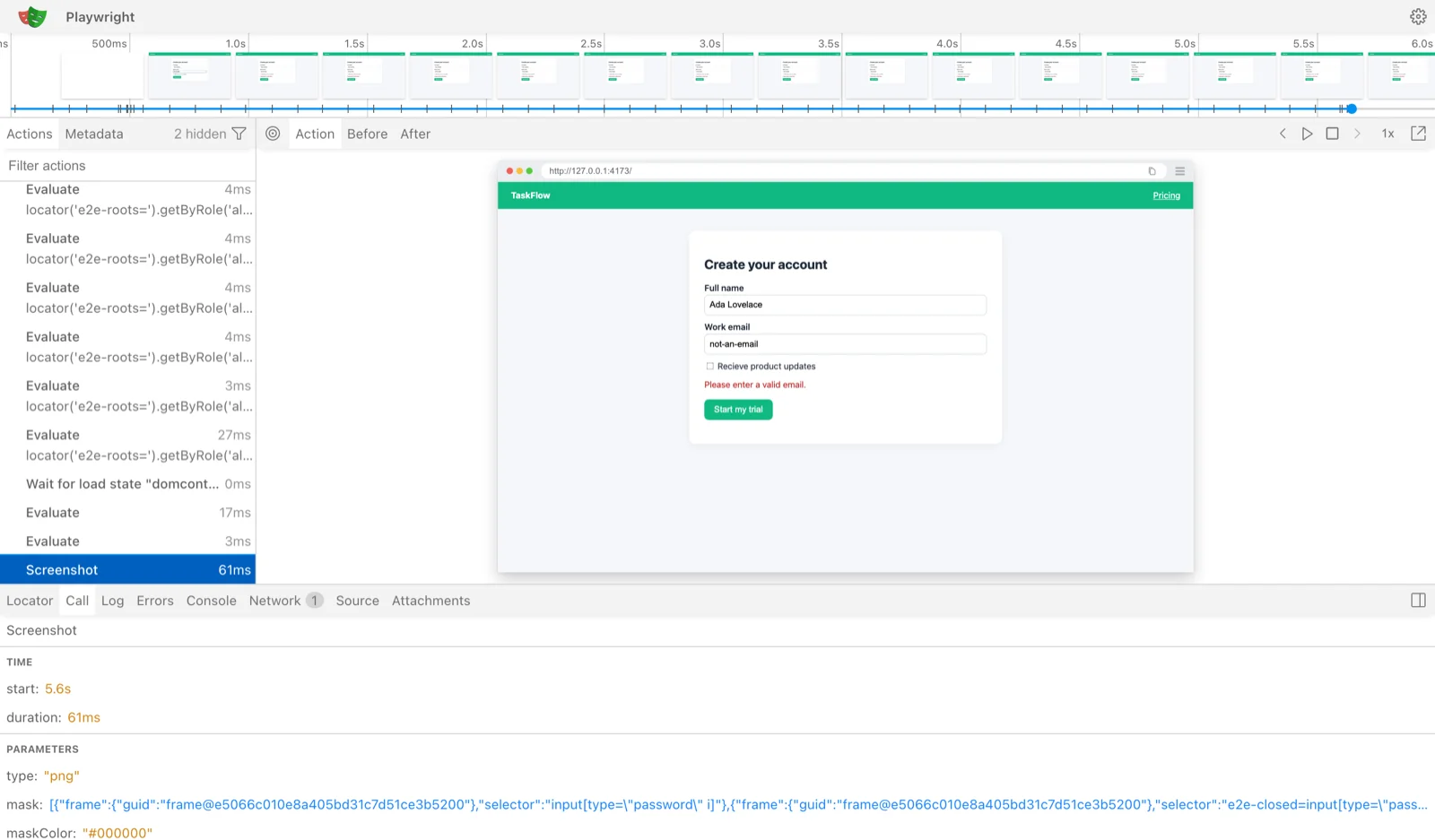
In e2e 0.18.0 (stable, used here) each failed attempt writes to .e2e/artifacts/<target>/<test>/default/attempt-0/: failure/screen.txt, screenshots/001-failure.png and trace/trace.zip, and the failure block prints a screen path. The official docs describe the 0.19 nightly, which writes .e2e/results/<test>/trace.md: one readable Markdown page per failed test, with the error, every step, the app log, the agent's last turns, the screen at failure and links to the screenshots. The failure block then prints a trace path instead. The habit is the same in both: open the path the failure block prints.
| Flag | Use it when |
|---|---|
--headed | You want to watch the browser (or device) while it runs. |
--video, --video=retain-on-failure | You need a recording, for example from CI. Videos are not masked; check them before sharing. |
--trace [mode] | Which attempts keep a trace: off, on, retain-on-failure, on-first-retry, on-all-retries. |
--debug | Prints phase timings and the agent step table to stderr: what the agent did, and how long it took. |
--ai-trace | Writes every model request and response to .e2e/ai-trace.json; summarise it with npx unbox-ai summary .e2e/ai-trace.json --run 1. |
--no-cache | A replayed step behaves oddly; force the agent to run live. Replayed steps make no model call and leave no AI trace. |
--last-failed | Rerun only the tests the previous run did not pass, read from .e2e/report.json. |
--reporter json | Print the report to stdout for scripts, or let your coding agent read .e2e/report.json. |
e2e init installed the e2e skill (.agents/skills/e2e/, linked into .claude/skills/) and the e2e mcp server. A coding agent such as Claude Code, Codex or Cursor can therefore run the suite, read report.json and the screen dumps, open a live app session over MCP to check locators, and propose the fix. Prompts like "why did this run fail?" or "add a test for checkout" work without more setup. For agents that need a pointer, add this line to AGENTS.md:
Agent steps send what is on screen to a model provider. e2e draws a clear boundary:
value=<secure>. Known secret values in model input and reports become <secret:name>.credentials in the config. In a test, credentials.user('admin').password is an opaque Secret with no .value. You can only fill it: screen.getByLabel('Password').fill(admin.password), or pass it in agent.act params, where the model sees its name and purpose and the runner types the value.It does not cover transformed values, images or app logs, and videos mask nothing. Use test accounts, never real customer credentials.
A CI job does the same steps on any service that runs Node: install dependencies, install browsers (or boot a device), and run npx e2e run. This is the web workflow from the e2e docs, verbatim. It assumes the config has an app.command that starts the app, and that the Vercel AI Gateway makes the model calls:
Each action is pinned to a commit SHA, and dependencies come from the lockfile. e2e-web install chromium --with-deps installs the browser that the engine's Playwright version expects, with its Linux libraries.
The model key and test-account credentials come from repository secrets. With npm and a Google key, use npm ci, npx e2e-web install chromium --with-deps and GOOGLE_GENERATIVE_AI_API_KEY instead.
if: ${{ !cancelled() }} uploads evidence even when tests fail, so a test that failed and then passed on retry keeps its evidence.
.e2e/artifactsThe workflow uploads .e2e/results, the 0.19 layout. On 0.18.0 the evidence is under .e2e/artifacts, so set path: .e2e/artifacts, or simply path: .e2e as the docs' mobile workflow does. Also note that in CI the runner ignores reuseExisting; it starts your app itself, or reports APP_ALREADY_RUNNING.
The @e2e-dev/github reporter posts one comment per run with failures, source links and links to the workflow artifacts. Reruns update the same comment, and it also writes the job summary.
Then give the workflow permission to comment, and pass the token to the test step:
Mobile jobs follow the same shape: build a Release app for the simulator or emulator, boot the device, install the build, run npx e2e run --target ios (or android). iOS needs a macOS runner; Android needs Linux with KVM. The docs also have ready workflows for EAS Workflows, Bitrise and Codemagic.
About 25 minutes, in your TaskFlow project.
Run the explore command from section 1. Confirm the typo finding and open its evidence image. Note the exit code with echo $?: it is 0, because the finding is a warning, not an issue.
Add tests/copy.e2e.ts from section 1 and run it. It must fail. Read the failure block and the screen dump: which node did the locator miss?
Add tests/broken.e2e.ts, run it, and open the three pieces of evidence: the screen dump, the failure screenshot and the trace (npx playwright-core show-trace). Fix the expected text.
Correct "Recieve" in app/index.html, then run npx e2e run --last-failed. Both tests should now pass.
ASSERTION_FAILED: expect.toBeVisible failed and observed: no node (match count 0), exit code 1: the tree shows checkbox "Recieve product updates", not "Receive".'Please enter a valid email.' (it matches exactly, including the full stop).--last-failed reruns only the two tests from report.json; exit code 0.Two to three hours. Use an app you are building, a course project, or one of the e2e example projects (Vite, Next.js, Astro, Expo, SwiftUI, Jetpack Compose, Kotlin Multiplatform, Flutter).
Install e2e, configure a model, and let the runner start your app with app.command (web) or point a mobile target at your build.
A goal (agent.act) for the flow, at least one agent.assert, and at least one exact expect. Run it twice and show the cache replay on the second run.
Run e2e explore with a written goal. Pick one finding, prove it with a failing test (or explain, with evidence, why it is not a bug).
Add .github/workflows/e2e.yml, store the model key as a repository secret, open a pull request, and show a green run with the report uploaded as an artifact. Bonus: the @e2e-dev/github comment.
A repository link and a one-page write-up: the flows covered, the explore finding and its test, one failure you debugged (with the evidence you used), and the token cost of a full run with and without cache.
Pick one answer per question, then check your score.
Answer in your own words first, then open the model answer.
e2e explore not yet a bug?The explorer can be wrong: a limit of the explorer, the local environment, intended design or seed data can explain it. Compare it with its evidence, then write a test that asserts the expected behaviour. Only a failing test proves the bug.
observed: no node. Name three likely causes.A wrong role or accessible name, text that is not exact, the element sits in an iframe, or an earlier step never happened (for example, native form validation blocked the submit). Read the screen dump to see what was there.
Once a secret has been typed, the app could display it anywhere on the screen, outside the masked field. Withholding pixels for the rest of the attempt keeps the value out of model input and reports.
Code 3 is an engine, app process, model provider or artifact failure. Retry if the cause is temporary (for example a provider outage); otherwise fix the environment, such as a missing browser or a wrong key.
All screenshots are from runs made for this course with e2e 0.18.0 and the TaskFlow demo app.
e2e explore takes a goal, drives the app and reports findings; issues fail the run, warnings do not.Secret handles; secret values are redacted and screenshots stop after a secret fill.--reporter list,junit, always upload the evidence, and optionally comment on the PR.Mark every module complete and claim your certificate. Then do the capstone; it is the best proof of what you learned.
Related on this site: CI/CD (DevOps Lab) · Testing AI-generated code (Vibe Coding)
